
When you join tables in SQL Server, the execution plan will usually choose one of these three operators:
Nested Loops / Hash Join / Merge Join.
Index
Create Sample Data
To make the differences between join algorithms easier to see, we’ll prepare a smaller Customers table
and a larger Orders table.
USE master;
GO
IF DB_ID('testdb') IS NULL
BEGIN
  CREATE DATABASE testdb;
END
GO
USE testdb;
GO

DROP TABLE IF EXISTS dbo.Orders;
DROP TABLE IF EXISTS dbo.Customers;
GO

-- Small(ish) table
CREATE TABLE dbo.Customers
(
  CustomerID  INT        NOT NULL CONSTRAINT PK_Customers PRIMARY KEY,
  CountryCode CHAR(2)    NOT NULL,
  CreatedAt   DATETIME2  NOT NULL
);
GO

-- Large table
CREATE TABLE dbo.Orders
(
  OrderID     BIGINT     NOT NULL IDENTITY(1,1) CONSTRAINT PK_Orders PRIMARY KEY,
  CustomerID  INT        NOT NULL,
  OrderDate   DATE       NOT NULL,
  Amount      INT        NOT NULL
);
GO

-- Customers: 100,000 rows
;WITH N AS
(
  SELECT TOP (100000) ROW_NUMBER() OVER (ORDER BY (SELECT NULL)) AS n
  FROM sys.all_objects a CROSS JOIN sys.all_objects b
)
INSERT dbo.Customers(CustomerID, CountryCode, CreatedAt)
SELECT
  n,
  CHAR(65 + (n % 26)) + CHAR(65 + ((n / 26) % 26)),
  DATEADD(DAY, -(n % 3650), SYSUTCDATETIME())
FROM N;

-- Orders: 2,000,000 rows
;WITH N AS
(
  SELECT TOP (2000000) ROW_NUMBER() OVER (ORDER BY (SELECT NULL)) AS n
  FROM sys.all_objects a CROSS JOIN sys.all_objects b CROSS JOIN sys.all_objects c
)
INSERT dbo.Orders(CustomerID, OrderDate, Amount)
SELECT
  (n % 100000) + 1,
  DATEADD(DAY, -(n % 3650), CONVERT(date, GETDATE())),
  (n % 20000) + 1
FROM N;

UPDATE STATISTICS dbo.Customers WITH FULLSCAN;
UPDATE STATISTICS dbo.Orders WITH FULLSCAN;
GO

-- Index for Join key on Orders
CREATE INDEX IX_Orders_CustomerID ON dbo.Orders(CustomerID) INCLUDE (OrderDate, Amount);
GO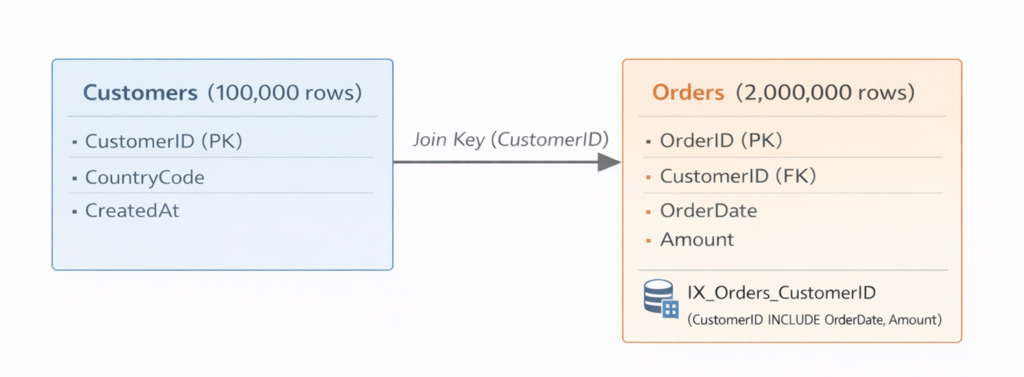
Nested Loops
How It Works
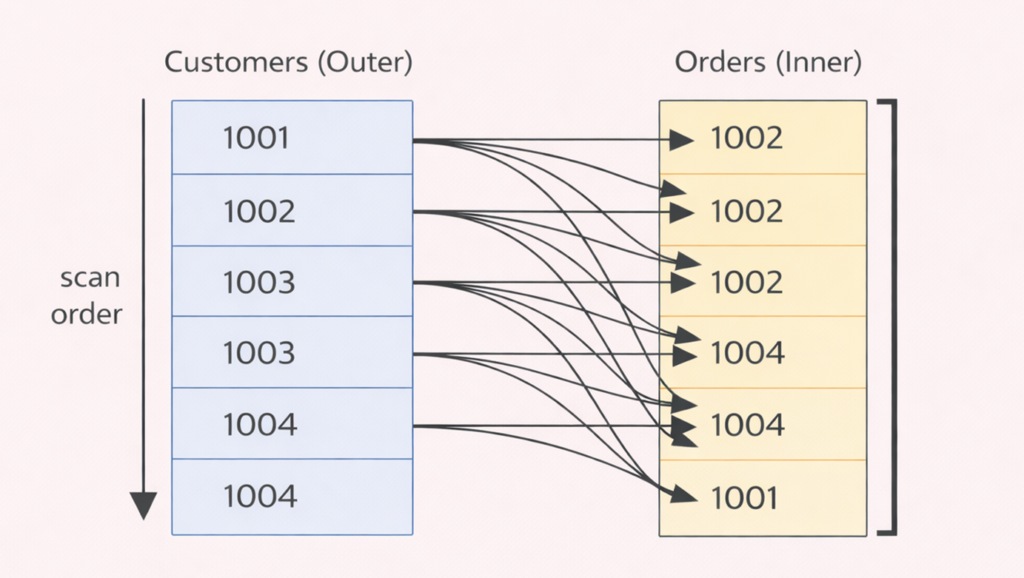
Nested Loops is basically the “double loop” idea.
SQL Server reads the Outer input first, and for each outer row, it searches the Inner input for matches.
- Read one row from the Outer input
- Use the join key from that row to search the Inner input (Seek / Scan)
- Output the matching joined rows
- Repeat for the next Outer row…
How to Identify Outer / Inner
In SSMS graphical execution plans, you can typically read Nested Loops inputs like this:
- The input coming from the top = Outer
- The input coming from the bottom = Inner
In the screenshot below:
- Top: Customers (Clustered Index Scan)
- Bottom: Orders (Index Seek using IX_Orders_CustomerID)
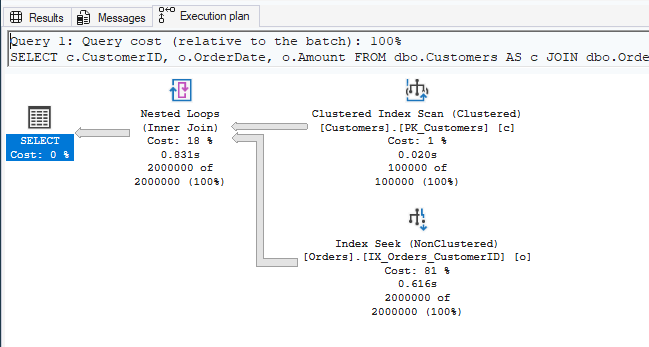
So in this case: Outer = Customers, Inner = Orders.
Conceptually, SQL Server reads Customers in order and uses CustomerID to look up matching rows in Orders via an index.
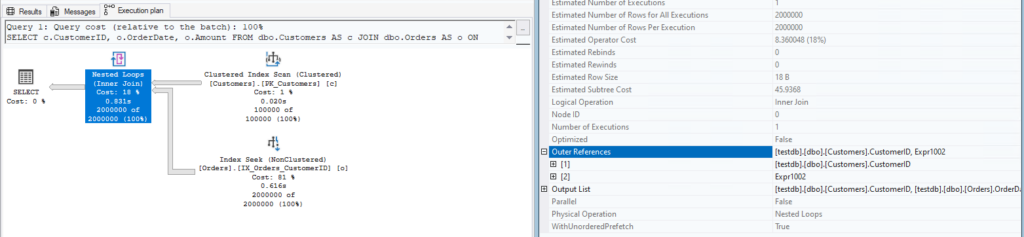
You can also confirm which side is Outer in the operator properties for Nested Loops.
When It’s Likely to Be Chosen
- The Outer input is small (or can be filtered down enough with WHERE)
- The Inner input can do an Index Seek on the join key (so each lookup is cheap)
- Early-exit patterns are used (TOP / EXISTS, etc.)
Forcing a Nested Loops Plan
If you want a specific join type for testing, you can use join hints.
To force Nested Loops, use OPTION (LOOP JOIN). Here we also set MAXDOP 1 to make comparisons simpler by avoiding parallelism.
SELECT c.CustomerID, o.OrderDate, o.Amount
FROM dbo.Customers AS c
JOIN dbo.Orders    AS o
  ON o.CustomerID = c.CustomerID
OPTION (LOOP JOIN, MAXDOP 1);
GO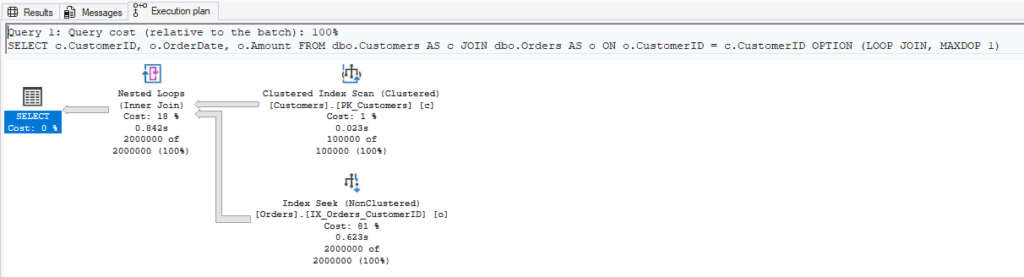
Swapping Outer / Inner and Comparing Plans
One important detail: OPTION (LOOP JOIN) forces the join type, but it does not lock in which input becomes Outer or Inner.
If you want to intentionally control join order, you need to fix the join sequence.
In SQL Server, you can do that with the join order in FROM/JOIN plus OPTION (FORCE ORDER).
The two queries below both force Nested Loops, force join order, and set MAXDOP 1.
Check the plan and confirm that the top input (Outer) and bottom input (Inner) swap between them.
Pattern A: Outer = Customers (fixed join order)
SELECT c.CustomerID, o.OrderDate, o.Amount
FROM dbo.Customers AS c
JOIN dbo.Orders    AS o
  ON o.CustomerID = c.CustomerID
OPTION (FORCE ORDER, LOOP JOIN, MAXDOP 1);
GO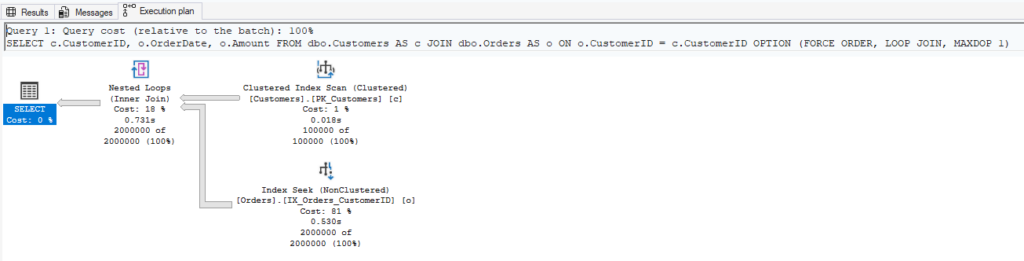
Pattern B: Outer = Orders (fixed join order)
SELECT c.CustomerID, o.OrderDate, o.Amount
FROM dbo.Orders    AS o
JOIN dbo.Customers AS c
  ON c.CustomerID = o.CustomerID
OPTION (FORCE ORDER, LOOP JOIN, MAXDOP 1);
GO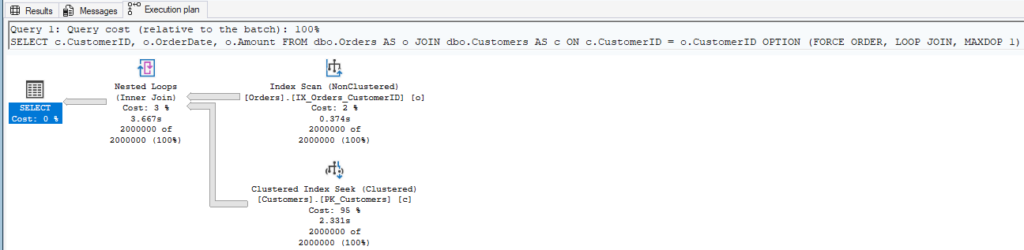
Notes
With Nested Loops, SQL Server takes one row from the Outer input and searches the Inner input for matching rows. Because this happens repeatedly, performance can degrade when the Outer input is large.
In our example, Customers has fewer rows, so the plan tends to be faster when Customers is the Outer input.
If Nested Loops is slow in your plan, it’s worth checking whether a large table ended up as the Outer input, and whether the Inner side is using an index properly (i.e., avoiding a table scan).
Hash Join
How It Works (Build / Probe)
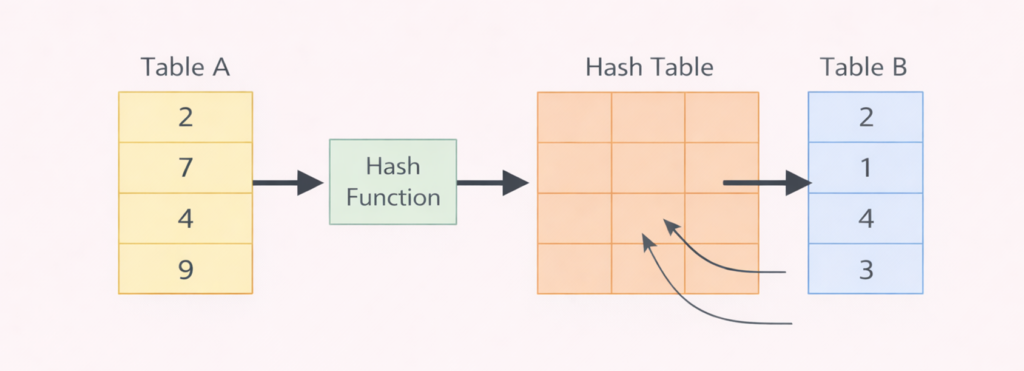
Hash Join builds a hash table from one input (Build), then uses the other input to probe it for matches.
It’s often chosen when Index Seeks are hard to rely on, or when Nested Loops would be too expensive for larger inputs.
When It’s Likely to Be Chosen
- Both inputs are large, so repeatedly searching the Inner side would be costly
- The join key doesn’t have a useful index (or the index won’t be used effectively), so scans are expected
- Sorted inputs aren’t available, so Merge Join is less attractive
Forcing a Hash Join Plan
OPTION (HASH JOIN) can be used to force Hash Join for testing.
SELECT c.CustomerID, COUNT(*) AS OrderCount, SUM(o.Amount) AS TotalAmount
FROM dbo.Customers AS c
JOIN dbo.Orders    AS o
  ON o.CustomerID = c.CustomerID
GROUP BY c.CustomerID
OPTION (HASH JOIN, MAXDOP 1);
GO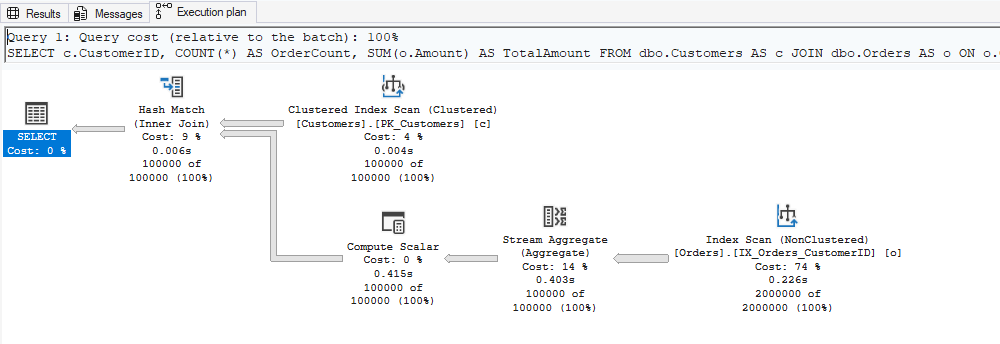
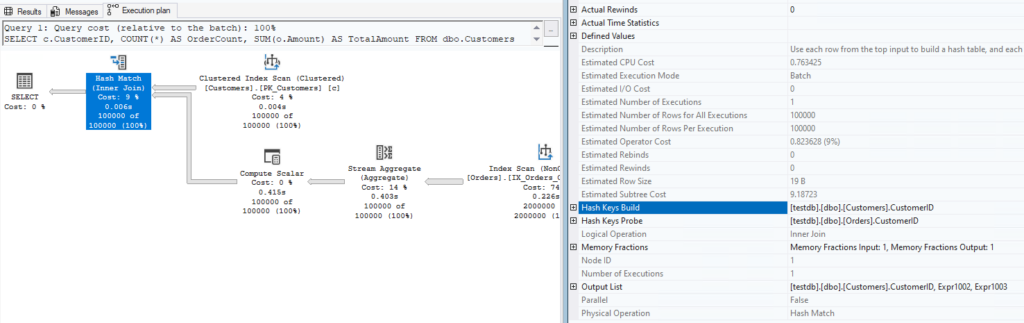
By checking the Hash Match operator properties, you can also see which input was used for Build and which one was used for Probe.
Notes
- Hash Join uses memory to build the hash table. If the build side is large, it may request a larger memory grant.
- If it can’t fit into the granted memory, a spill to tempdb can happen (sometimes shown as a warning in the plan).
Merge Join
How It Works (Sorted Input)
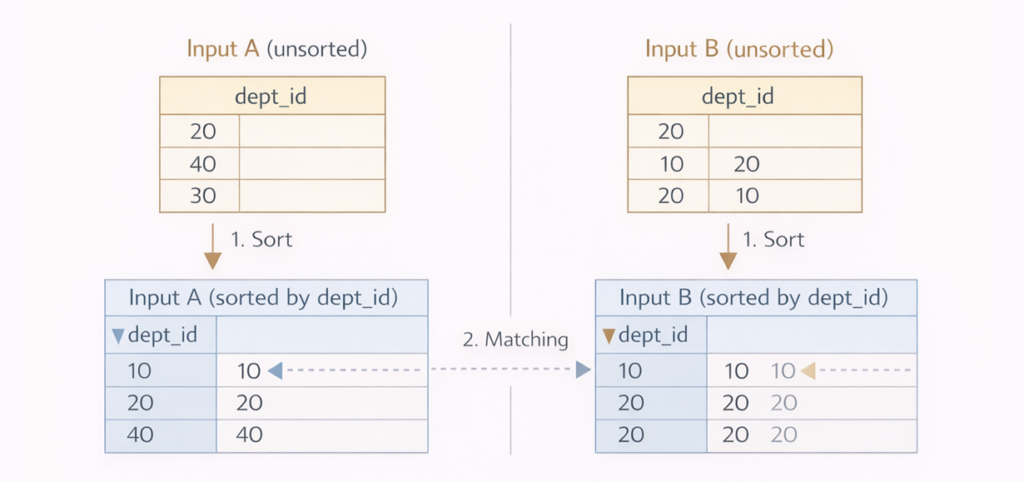
Merge Join shines when both inputs are already sorted by the join key (or can be read in that order).
It walks through both inputs from the start and advances pointers based on key comparisons, outputting matches along the way.
When It’s Likely to Be Chosen
- Both inputs can be read in join-key order (e.g., via index scans)
- Even if a Sort is needed, the optimizer estimates Merge Join is still cheaper (but Sort can be expensive, so this is not always the case)
Forcing a Merge Join Plan
OPTION (MERGE JOIN) can be used to force Merge Join for testing.
SELECT c.CustomerID, o.OrderDate, o.Amount
FROM dbo.Customers AS c
JOIN dbo.Orders    AS o
  ON o.CustomerID = c.CustomerID
WHERE c.CustomerID BETWEEN 1 AND 50000
OPTION (MERGE JOIN, MAXDOP 1);
GO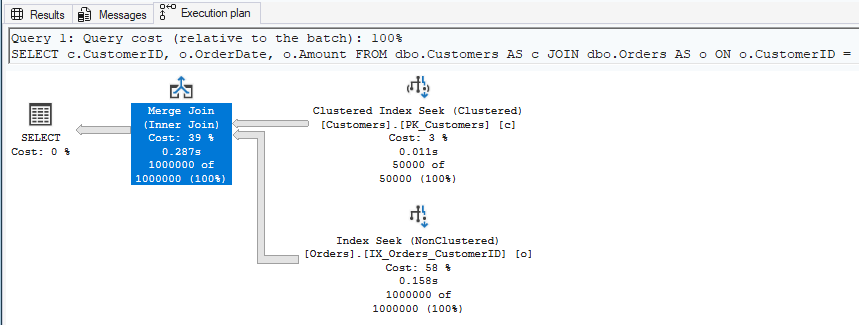
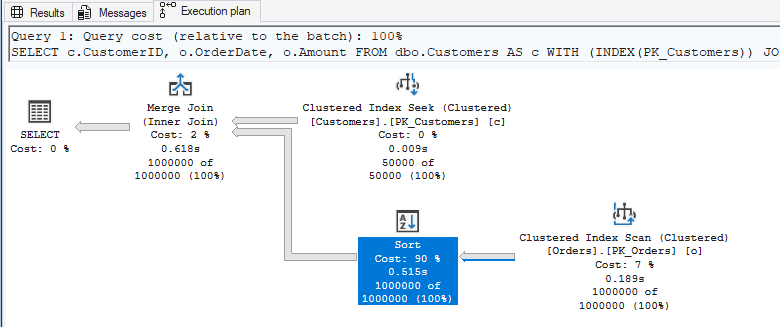
What to Look for in the Plan (Sort vs No Sort)
- Merge Join assumes Sorted Input. If the inputs are not sorted, SQL Server may need to Sort first, which can raise the cost.
- Whether Sort appears in the plan is a key detail—it can completely change the value of using Merge Join.
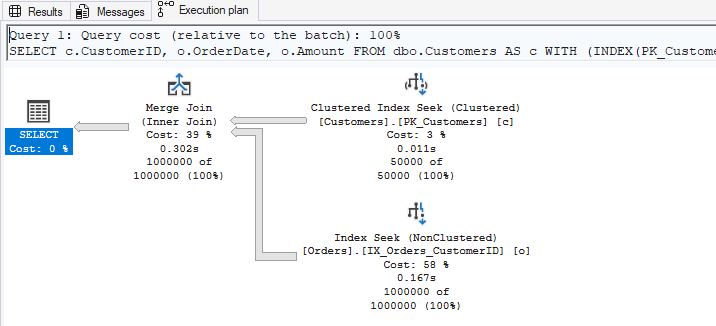
No Sort (when inputs are already sorted)
If both inputs can be read in join-key order (CustomerID), the plan may not need an explicit Sort.
For example, Customers can be read in CustomerID order via the PK, and Orders can be read in CustomerID order via IX_Orders_CustomerID.
SELECT c.CustomerID, o.OrderDate, o.Amount
FROM dbo.Customers AS c WITH (INDEX(PK_Customers))
JOIN dbo.Orders    AS o WITH (INDEX(IX_Orders_CustomerID))
  ON o.CustomerID = c.CustomerID
WHERE c.CustomerID BETWEEN 1 AND 50000
OPTION (MERGE JOIN, FORCE ORDER, MAXDOP 1);
GO
Sort (when inputs are not in join-key order)
If one (or both) inputs can’t be read in join-key order, SQL Server may insert Sort before Merge Join.
For example, scanning Orders via PK_Orders (OrderID order) is not CustomerID order, so it does not satisfy Sorted Input.
SELECT c.CustomerID, o.OrderDate, o.Amount
FROM dbo.Customers AS c WITH (INDEX(PK_Customers))
JOIN dbo.Orders    AS o WITH (INDEX(PK_Orders))
  ON o.CustomerID = c.CustomerID
WHERE c.CustomerID BETWEEN 1 AND 50000
OPTION (MERGE JOIN, FORCE ORDER, MAXDOP 1);
GO
Summary
- Nested Loops: Great when the Outer input is small and the Inner side can use Index Seek.
- Hash Join: Often chosen for larger inputs or when seeks aren’t realistic. Watch for memory grants and spills.
- Merge Join: Strong when both inputs are already sorted by the join key. Whether Sort appears is a big deal.