Troubleshooting

SQL Server

SQL Server Sleeping Session Blocking: Find the Open Transaction

Find why a sleeping SQL Server session blocks queries. Use DMV checks to inspect open transactions, identify the owner, and choose a safe next step.
Redis

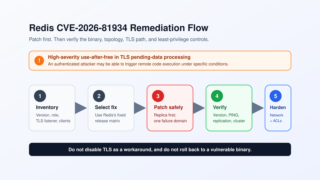
Redis CVE-2026-81934: Patch Matrix and DBA Remediation Runbook

Check affected Redis versions, choose the correct fixed release, patch standalone, Sentinel, and Cluster deployments, and verify network and ACL hardening.
MySQL

MySQL Error 1045: Fix Access Denied for User

Fix MySQL Error 1045 by checking user@host matching, password use, account locks, authentication plugins, TLS requirements, and exact grants.
Oracle

ORA-12154: Fix Could Not Resolve Connect Identifier

Fix ORA-12154 by checking the exact connect identifier, TNS_ADMIN, sqlnet.ora naming methods, tnsnames.ora syntax, and the Oracle client in use.
SQL Server

Fix 0x851A001A: Database Engine Recovery Handle Failed

Fix SQL Server setup error 0x851A001A. Read ERRORLOG first, check NVMe sector size with fsutil, and apply the supported 4 KB workaround safely.
SQL Server

SQL Server 2025 Performance Regression: Query Store Workflow

Queries slower after a SQL Server 2025 upgrade? Separate engine, compatibility, and environment changes, then use Query Store to find and mitigate regressions.
SQLite

SQLite “Database Is Locked”: WAL Mode, busy_timeout, and a Reliable Fix

Diagnose and fix SQLITE_BUSY and “database is locked” with short transactions, WAL mode, busy_timeout, checkpoints, and writer serialization.
SQL Server

Fix SQL Server “SSL Security Error” and Native Error 18

A certificate-first workflow for SQL Server SSL Security Error, untrusted certificate chain failures, and Native Error 18 after driver upgrades.
SQL Server

Error 665 – The operating system returned error 665(The requested operation could not be completed due to a file system limitation)

QL Server Error 665 occurs when NTFS hits the 256KB ATTRIBUTE_LIST limit. Learn how to confirm it with fsutil and apply proven fixes and workarounds.
SQL Server

SQL Server Error 9002: Fix a Full Transaction Log Safely

Fix SQL Server Error 9002 safely by checking log_reuse_wait_desc, log space, autogrowth, active transactions, backups, HA, and replication.