
DBA PARK may earn a commission from purchases through links in this article, at no extra cost to you.
1. Quick answer: how to encrypt SQL Server connections
To encrypt every incoming connection to SQL Server, install and bind a certificate that meets SQL Server requirements, grant the SQL Server service account read access to its private key, set Force Encryption = Yes in SQL Server Configuration Manager, restart the instance, and verify the result with sys.dm_exec_connections.
For SQL Server 2022 (16.x) or later, Force Strict Encryption adds TDS 8.0 and stricter certificate validation. Enable it only after confirming that every client uses a compatible driver and trusts a certificate whose Subject Alternative Name matches the connection name. Older or incompatible clients will fail to connect.
| Goal | Recommended setting | Key requirement |
|---|---|---|
| Encrypt selected applications | Client connection string: Encrypt=True;TrustServerCertificate=False | Trusted certificate and matching DNS name |
| Encrypt every incoming connection | Server: Force Encryption = Yes | Test all clients, then restart SQL Server |
| Use TDS 8.0 strict encryption | SQL Server 2022+: Force Strict Encryption = Yes | Compatible drivers and a verifiable certificate |
The TDE article covers data at rest. This guide covers a different layer: TLS protection for credentials, queries, and results while they travel over the network. Login credentials are encrypted during sign-in, but without connection encryption, later query and result traffic can remain unencrypted.
1-1. Requirements & Scope
- SQL Server: On-premises SQL Server and Azure SQL (MI/DB) are both applicable.
- Certificate: A server certificate with a private key in
Local Computer > Personal, EKU = Server Authentication, and proper DNS names in SAN. - Ports: Default 1433 for default instance; named instances often use dynamic ports and SQL Browser (UDP 1434).
2. What is Connection Encryption?
By default, SQL Server does not encrypt query or data traffic, and sends/receives it in plaintext. To protect communication from “eavesdropping,” “tampering,” and “spoofing,” TLS (formerly SSL) encryption is required.
3. How Connection Encryption Works
When connecting, SQL Server uses a certificate to perform a TLS handshake and establish a secure session.
- Login packets (username/password) are always encrypted.
- Queries and result sets (data packets) are encrypted depending on the connection string and server settings.
4. Detailed Flow of Encrypted Communication
4-1. Overall Flow
- Client sends connection request (e.g., connection string with
Encrypt=Trueor server-side Force Encryption enabled). - Server presents its certificate (public key, CN/SAN, issuing CA, validity period, etc.).
- TLS handshake: negotiate cipher suite, key exchange (e.g., ECDHE), certificate validation.
- Generate session key (symmetric key): subsequent traffic is encrypted with a symmetric algorithm (e.g., AES).
- Encrypted session established: queries/results are exchanged over TDS (Tabular Data Stream) in encrypted form.
4-2. Key Points for Certificate Validation
- Signed by a trusted CA? (Self-signed works for testing only.)
- Target hostname (FQDN) matches CN or SAN DNS entries?
- Still within validity period and not revoked?
- Has the Server Authentication EKU; private key is present and readable by the SQL Server service account?
Note: Using TrustServerCertificate=True bypasses validation. Skipping validation increases the risk of man-in-the-middle attacks, so in production environments set this to False (validate).
4-3. ASCII Diagram (Concept)
[Client]                              [Server]
   |  TCP Connection Request              |
   |--------------------------------------->|
   |  Encryption Request (Encrypt=True or ForceEnc) |
   |--------------------------------------->|
   |  Server Certificate Sent              |
   |<---------------------------------------|
   |  Certificate Validation (CA, FQDN, Expiry)    |
   |--------------------------------------->|
   |  Cipher Suite Negotiation              |
   |<---------------------------------------|
   |  Key Exchange (e.g., ECDHE)            |
   |<-------------------------------------->|
   |  Session Key Generation                |
   |<-------------------------------------->|
   |  TLS Session Established               |
   |<======================================>|
   |  Query / Data Transmission (Encrypted) |
   |<======================================>|
5. How to Configure Encryption
5-1) Modify the Application Connection String
The easiest way is to require encryption in the client’s connection string.
- Basic:
Encrypt=True; TrustServerCertificate=False; - Meaning:
Encrypt=True: Require TLS encryption.TrustServerCertificate=False: Validate the server certificate (recommended).
ADO.NET (C#) example:
var conn = new SqlConnection(
  "Server=myServer;Database=myDB;User Id=myUser;Password=myPass;" +
  "Encrypt=True;TrustServerCertificate=False;"
);
JDBC example:
jdbc:sqlserver://myServer:1433;database=myDB;encrypt=true;trustServerCertificate=false;
ODBC example (connection string):
Driver={ODBC Driver 18 for SQL Server};Server=myServer,1433;Database=myDB;
Encrypt=Yes;TrustServerCertificate=No;UID=myUser;PWD=myPass;
5-2) Configure “Force Encryption” on the SQL Server Side
- Prepare a server certificate (trusted CA or self-signed for testing).
- Open SQL Server Configuration Manager → “SQL Server Network Configuration” → “Protocols” for the target instance → Certificate tab to select the certificate.
- In the Flags tab, set Force Encryption to Yes.
- Restart the SQL Server service to apply changes.
With this setting, the server forces encryption even if the client does not request it. Non-TLS-capable clients will be unable to connect.
5-3) Force Encryption vs. Force Strict Encryption
| Setting | Protocol behavior | Compatibility | Use when |
|---|---|---|---|
| Force Encryption | Requires encrypted client traffic using the traditional TDS 7.x negotiation | Broader support across SQL Server client drivers | You need server-wide encryption and still support older clients |
| Force Strict Encryption | Uses TDS 8.0 for end-to-end TLS wrapping and strict certificate validation | SQL Server 2022+; ODBC Driver 18.1.2.1+ or OLE DB Driver 19.2.0+ | Every client is compatible and certificate trust/name validation is ready |
Strict encryption is not simply a stronger checkbox for an existing deployment. Inventory and test every driver first. Microsoft documents strict mode for SQL Server 2022 (16.x) and later; unsupported clients cannot fall back to a non-strict connection.
See Microsoft Learn: configure encrypted SQL Server connections and connect with strict encryption.
5-4) Check driver defaults explicitly
Encryption defaults differ by driver and driver version. Do not assume that an application is encrypted because a newer driver is installed. Specify the intended encryption mode and certificate-validation behavior in the connection configuration, test the exact production driver, and confirm the live session with sys.dm_exec_connections.
5-5) SSMS & sqlcmd quick recipes
SSMS: Connection Properties → “Encrypt connection” (on). For strict validation, ensure the server name matches the certificate and that the CA is trusted.
sqlcmd (classic):
:: Windows auth
sqlcmd -S myserver.contoso.com,1433 -d mydb -E -N

:: SQL auth (test-only if bypassing validation)
sqlcmd -S myserver.contoso.com,1433 -d mydb -U myuser -P "myp@ss" -N -C
go-sqlcmd:
# Enforce encryption
sqlcmd -S myserver.contoso.com,1433 -d mydb -U myuser -P 'myp@ss' -N true

# Test-only: bypass validation
sqlcmd -S myserver.contoso.com,1433 -d mydb -U myuser -P 'myp@ss' -N true --trust-server-certificate
6. How to Check if the Connection is Encrypted
Run the following SQL in the same session to verify:
SELECT encrypt_option
FROM sys.dm_exec_connections
WHERE session_id = @@SPID;
encrypt_option = TRUE→ Encryptedencrypt_option = FALSE→ Plaintext
All sessions view (handy in prod):
SELECT session_id, client_net_address, encrypt_option, protocol_type, local_tcp_port
FROM sys.dm_exec_connections
ORDER BY session_id;
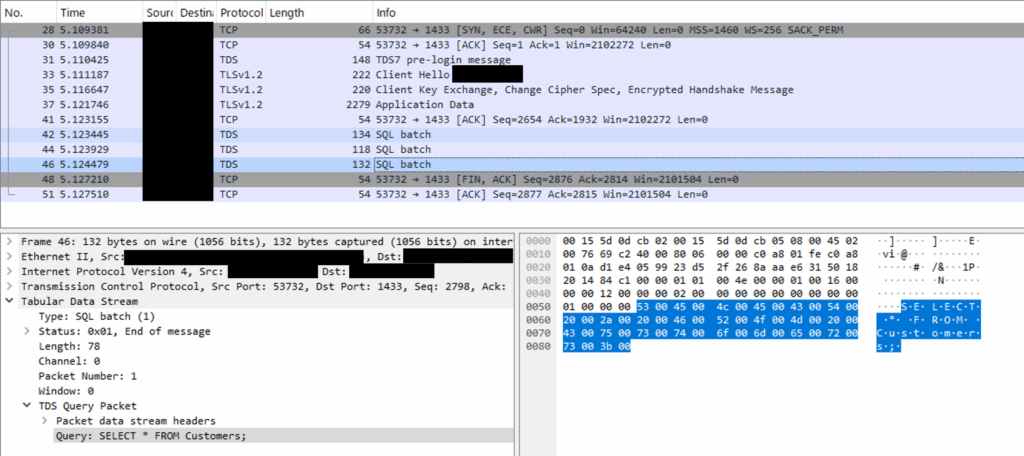
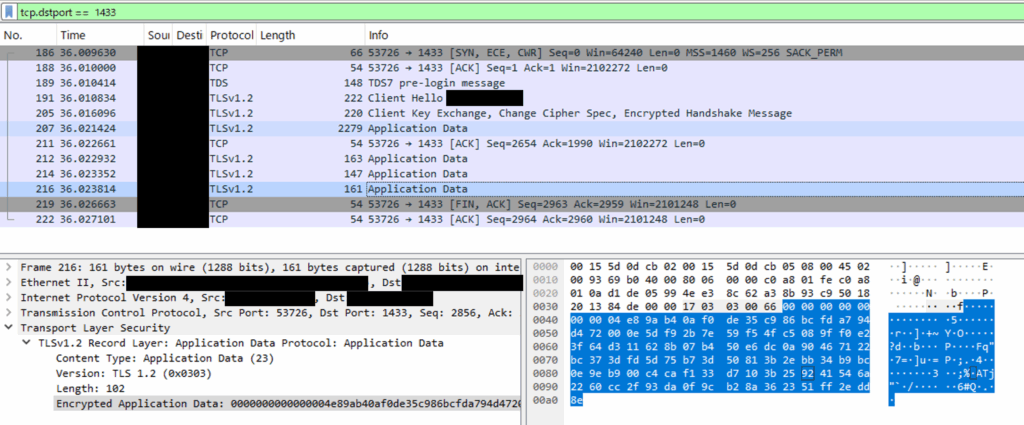
6.5 Viewing the Difference in Wireshark (Encrypted vs Unencrypted)
The effect of encryption can be easily verified using a network analysis tool such as Wireshark.
When Encryption is Disabled
- SQL Server communicates using the Tabular Data Stream (TDS) protocol.
- If encryption is disabled, Wireshark will show queries and result data in plaintext within TDS packets.
- Queries after login (e.g.,
SELECT * FROM Customers) and portions of the result can be seen directly as ASCII text.
When Encryption is Enabled
- TDS packets are encapsulated within TLS payloads and appear as Application Data.
- Query strings and result sets are not visible; only binary encrypted data is shown.
- Even in Wireshark’s “Follow TCP Stream,” the content appears as unreadable encrypted data.
Capture Example (Concept)
Without Encryption:
With Encryption:
Wireshark filters (quick reference)
tcp.port == 1433                  # default instance
udp.port == 1434                  # SQL Browser (named instances)
tcp.dstport == 1433 || tcp.dstport == 15000  # combine multiple ports
ip.addr == 192.168.1.50 && tcp.port == 1433  # narrow by host
Note: Named instances often use dynamic TCP ports; confirm withSELECT local_net_address, local_tcp_port FROM sys.dm_exec_connections WHERE session_id = @@SPID;
7. Troubleshooting
- “The certificate chain was issued by an authority that is not trusted.”
Import the issuing CA chain to the Trusted Root store (Local Computer), or use a publicly trusted CA. - “The certificate’s CN name does not match the passed value.”
Use FQDN in the connection string that matches the certificate’s CN/SAN. - Force Encryption is enabled and clients fail to connect
Update client drivers to support TLS; verify CA trust and hostname validation. - No certificate appears in Configuration Manager
Ensure the cert with a private key is inLocal Computer > Personaland EKU includes Server Authentication.
8. Summary and Notes
- Verify in a test environment before applying to production.
- Enabling Force Encryption requires TLS-capable and properly configured clients.
- Always validate certificates (TrustServerCertificate=False) to reduce man-in-the-middle risk.
- Combine with Always Encrypted and TDE to protect both data at rest and data in transit.
Continue learning: To reinforce the administration skills behind secure connections, browse Udemy and search for SQL Server administration courses with exercises on instance configuration, authentication, and security. For hands-on practice with SQL Server queries and database fundamentals, explore DataCamp.