DBA PARK may earn a commission from purchases through links in this article, at no extra cost to you.
Oracle Database 19c Release Update 19.32 adds something many long-lived 19c estates have been waiting for: TLS 1.3, a next-generation cryptographic provider, FIPS 140-3 mode, and post-quantum key exchange options. The important operational detail is that installing RU 19.32 does not automatically move an existing database to TLS 1.3. The legacy provider remains the default, so the migration must be planned, enabled, restarted, and verified.
This guide presents a staged path for DBAs who already use TCPS with Oracle Database 19c. It keeps TLS 1.2 available during client validation, proves the protocol negotiated by each connection, and treats TLS 1.3 enforcement, ML-KEM, and FIPS 140-3 as separate change phases.
What You’ll Learn: determine whether an Oracle 19c environment is ready for the new provider, enable it safely, verify TLS 1.3 from SQL, identify common incompatibilities, enforce TLS 1.3 when appropriate, and prepare a practical rollback.
1. What Changed in Oracle Database 19.32
Oracle Database 19.32 introduces a next-generation cryptographic provider based on OpenSSL in addition to the existing legacy provider. The two providers have materially different capabilities.
| Capability | Legacy provider | Next-generation provider |
|---|---|---|
| TLS versions | TLS 1.0, 1.1, and 1.2 | TLS 1.2 and 1.3 |
| TLS 1.3 | Not supported | Supported |
| FIPS modes | FIPS 140-2 | FIPS 140-2 and 140-3 |
| Post-quantum key exchange | Not supported | ML-KEM and hybrid groups |
| Legacy algorithms | Some older algorithms remain available | DES, RC2, RC4, RC5, SEED, GOST, TLS 1.0, and TLS 1.1 are not supported |
TLS 1.3 is available only when the next-generation provider is active. Applying RU 19.32 alone does not change the provider, network protocol, wallets, or client behavior. This default protects existing applications from an unexpected cryptographic change, but it also means the DBA must explicitly complete the migration.
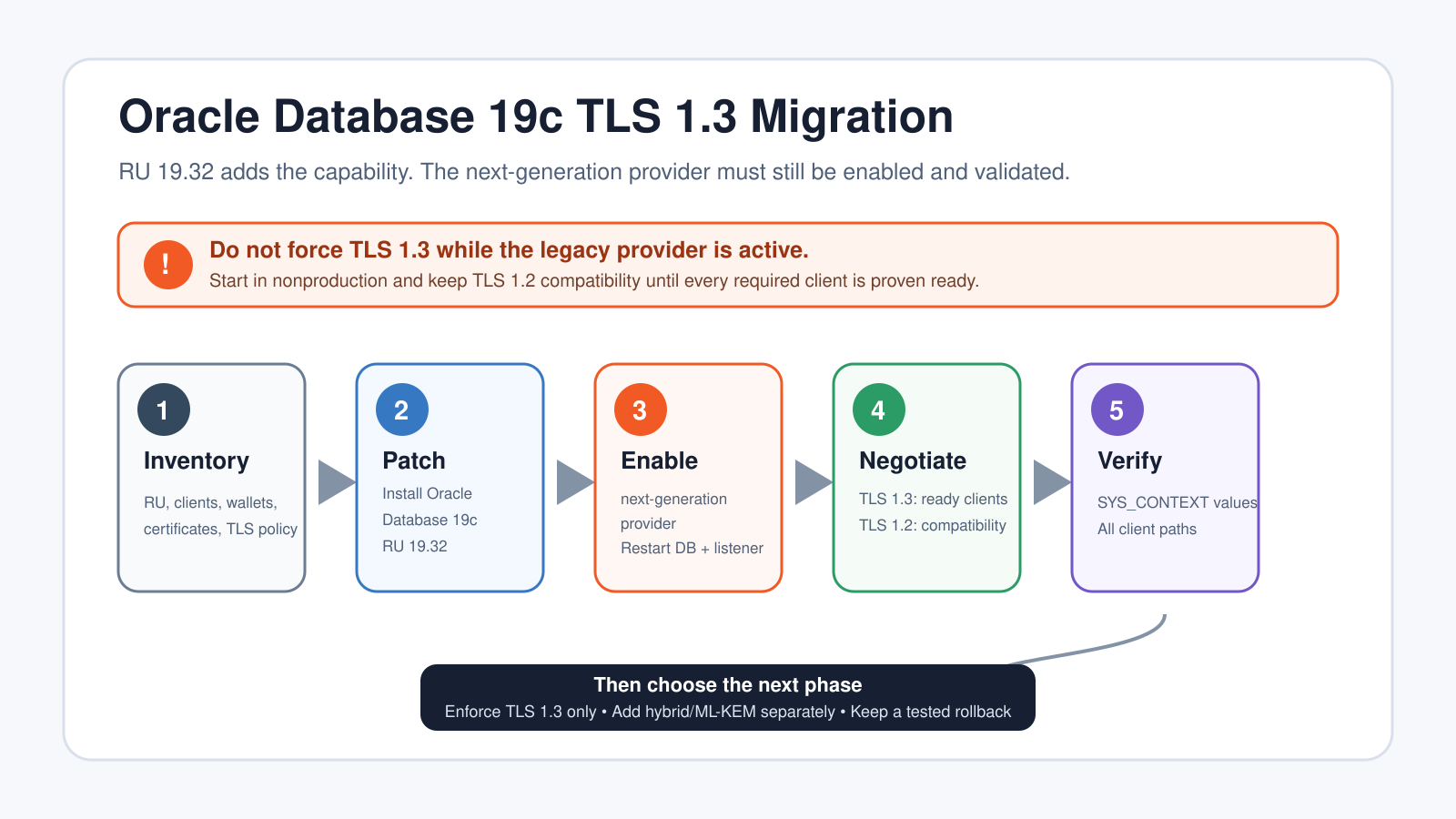
Do not add
TLS_VERSION=(1.3)while the legacy provider is still active. Oracle documents that connections fail in that configuration.
2. Use a Phased Migration, Not a Single Toggle
The safest production sequence is:
- Inventory the server, listener, wallets, certificates, clients, and current TLS policy.
- Install RU 19.32 using the organization’s normal patching procedure.
- Enable the next-generation provider in a representative nonproduction environment.
- Restart the database and Oracle Net listener.
- Allow both TLS 1.2 and TLS 1.3 during the compatibility window.
- Verify the negotiated protocol and cipher suite from every important client path.
- Enforce TLS 1.3 only after all required clients pass.
- Test ML-KEM or FIPS 140-3 in separate later changes if the business requires them.
This separation makes failures diagnosable. If the provider switch, protocol policy, certificate replacement, and post-quantum configuration are introduced together, a failed connection does not clearly identify which layer caused the problem.
3. Inventory Before Changing the Provider
Start with the database and Oracle Home versions. Run the checks on every Oracle Home that serves a database, listener, or client involved in the path.
$ORACLE_HOME/OPatch/opatch lspatches
$ORACLE_HOME/OPatch/opatch lsinventory

sqlplus / as sysdba <<'SQL'
SET LINESIZE 220
SELECT banner_full FROM v$version;
SHOW PARAMETER wallet_root
SQL

lsnrctl status
Confirm that the database and listener are using the intended RU 19.32 Oracle Home. In environments with out-of-place patching, a correctly patched home is not enough; the running processes must actually start from that home.
Record the current provider and network settings:
python $ORACLE_HOME/bin/set_crypto_provider.py status

grep -RniE 'TLS_|SSL_|WALLET_LOCATION' \
  "$ORACLE_HOME/network/admin"
Search every effective configuration location, not only the default directory. TNS_ADMIN, application-specific client directories, Oracle RAC homes, Connection Manager, gateways, and container images can each carry a separate sqlnet.ora or tnsnames.ora.
Your inventory should include:
- Database and listener RU levels.
- OCI, JDBC thin, JDBC thick, Python, ODP.NET, Node.js, SQL*Plus, and application-server versions.
- JDK, .NET, and OpenSSL versions used by thin clients.
WALLET_ROOT, listenerWALLET_LOCATION, client wallets, and operating-system trust stores.- Certificate issuer, subject, SAN, key type, signature algorithm, expiration, and renewal owner.
- Existing
TLS_VERSION,TLS_DISABLE_VERSION,TLS_CIPHER_SUITES,TLS_CLIENT_AUTHENTICATION, andTLS_KEY_EXCHANGE_GROUPSvalues. - RAC, DRCP, CMAN, database links, gateways, monitoring, backup agents, and connection pools.
Replace certificates signed with MD5 or SHA-1 before the provider change. Identify TLS 1.0 and TLS 1.1 connections and move them to TLS 1.2 or later. Also locate explicit weak cipher lists and older wallets that may depend on 3DES.
4. Apply RU 19.32 First
Use the normal Oracle patching and rollback procedure for the platform, topology, and support contract. Validate the patch in nonproduction, back up the Oracle inventory and relevant configuration according to the existing runbook, and preserve the pre-change output collected above.
After patching, verify the running home and database version again. Do not enable the new provider until RU 19.32 is confirmed on the database and listener homes involved in the TCPS path.
For RAC, Data Guard, or multiple listeners, define the rolling or outage strategy before the change. The cryptographic provider is selected for an Oracle Home and takes effect after process restart, so mixed states must be planned rather than discovered during failover.
5. Enable the Next-Generation Provider
In a representative test environment, run the provider switch from the RU 19.32 Oracle Home:
python $ORACLE_HOME/bin/set_crypto_provider.py next-generationRestart the database instance and restart or reload the Oracle Net listener. Then verify the active provider:
python $ORACLE_HOME/bin/set_crypto_provider.py statusThe switch is all-or-nothing for the affected database instance; it is not enabled for one service or one session at a time. Existing wallet files are not rewritten by this command, but certificates that use algorithms unsupported by the new provider cannot be used for TLS authentication.
At this point, test the existing TCPS connection without simultaneously forcing TLS 1.3 or changing cipher policy. A successful connection proves the provider, wallets, certificates, and current compatibility settings work together.
6. Establish a TLS 1.3 Compatibility Window
Oracle recommends beginning close to the defaults. With the next-generation provider active and no explicit TLS_VERSION, Oracle negotiates the highest protocol supported by both endpoints. A capable client can therefore use TLS 1.3 while a known compatibility client continues to use TLS 1.2.
For the initial transition:
- Keep the existing TCPS listener and tested wallet model.
- Remove old
TLS_VERSIONpinning unless it is still required. - Do not set
TLS_CIPHER_SUITESunless policy requires an explicit list. - Do not set
TLS_KEY_EXCHANGE_GROUPSduring the initial provider test. - Keep
TLS_CLIENT_AUTHENTICATION=FALSEunless mutual TLS is already required.
If an explicit compatibility policy is required, Oracle supports either of these settings in sqlnet.ora:
# Permit TLS 1.2 and TLS 1.3
TLS_VERSION=(1.2 or 1.3)

# Equivalent minimum-version form
TLS_VERSION=(1.2+)
Use the same compatible policy on the endpoints involved in the test. A client and server must share at least one protocol version and an acceptable cipher suite.
7. Verify the Negotiated Protocol from SQL
A successful login proves reachability, but it does not prove TLS 1.3. Connect through the same TCPS alias, driver, application server, load balancer, and service name used by the workload, then query the session:
SELECT sys_context('USERENV','NETWORK_PROTOCOL') AS network_protocol
FROM dual;

SELECT sys_context('USERENV','TLS_VERSION') AS tls_version
FROM dual;

SELECT sys_context('USERENV','TLS_CIPHERSUITE') AS tls_ciphersuite
FROM dual;
For a TLS 1.3-ready client, the expected result resembles:
NETWORK_PROTOCOL  TCPS
TLS_VERSION       TLSv1.3
TLS_CIPHERSUITE   TLS_AES_256_GCM_SHA384
The exact returned version formatting can vary by client and release, so validate the semantic result: the network protocol is TCPS, the expected TLS version was negotiated, and the cipher suite matches the approved policy.
Repeat this test for every important path. Test SQL*Plus, application pools, JDBC, OCI, Python, ODP.NET, monitoring, backup, database links, RAC services, and disaster-recovery connections separately. One successful SQL*Plus test on the database host does not validate a remote application’s runtime or trust store.
8. Enforce TLS 1.3 Only After Client Validation
When all required clients negotiate TLS 1.3 successfully, you can require it in the server and client sqlnet.ora files:
TLS_VERSION=(1.3)Restart the database instance and Oracle Net listener as documented for the environment, reconnect each representative client, and rerun the three SYS_CONTEXT queries. Also perform application transactions, connection-pool recycling, failover, database link, monitoring, and backup tests.
If a required client still needs TLS 1.2, do not hide that dependency. Keep the compatibility policy, identify the owner, record the exact runtime limitation, and set a removal date. Enforcing TLS 1.3 prematurely converts a security improvement into an outage.
9. Use Explicit Cipher Suites Only When Required
The next-generation provider can negotiate strong defaults. Oracle recommends leaving TLS_CIPHER_SUITES unset unless an organizational or regulatory policy requires explicit selection.
If a narrow TLS 1.3 list is required, a documented example is:
TLS_CIPHER_SUITES=(TLS_AES_256_GCM_SHA384,TLS_AES_128_GCM_SHA256)Oracle lists TLS_AES_256_GCM_SHA384 as the recommended TLS 1.3 cipher suite. Do not carry an old TLS 1.2 CBC or RSA compatibility list into the new provider without reviewing every entry. Cipher selection and certificate signature support are separate concerns.
10. Add ML-KEM as a Separate Phase
After the TLS 1.3 baseline is stable, Oracle 19.32 can use ML-KEM or hybrid post-quantum key exchange. ML-KEM requires the next-generation provider, TLS 1.3, and compatible client, listener, server, and runtime support.
Oracle recommends starting with hybrid key establishment rather than immediately requiring only post-quantum groups:
TLS_KEY_EXCHANGE_GROUPS=(hybrid,ml-kem)Support varies by driver and runtime. OCI-based clients provide a clear path; thin clients can depend on the JDK, .NET implementation, operating system, or OpenSSL version. For example, Oracle’s current matrix notes that Python thin on Linux needs OpenSSL 3.5 or later for PQC, while ODP.NET managed and ODP.NET Core on Windows can use TLS but do not currently provide PQC over TLS.
Do not assume that a TLS 1.3 connection used ML-KEM. Protocol version, cipher suite, certificate algorithm, and key-exchange group are different properties. Validate the negotiated key exchange with the tooling and driver guidance for the tested stack.
11. Plan and Test the Rollback
If the provider change causes an incompatibility that cannot be resolved in the change window, Oracle documents a return to the legacy provider:
python $ORACLE_HOME/bin/set_crypto_provider.py legacyRestore any legacy FIPS settings only if they were part of the approved pre-change configuration, then restart the database instance and Oracle Net listener. Reconnect through TCPS and verify the negotiated protocol again.
Remember the consequences: the legacy provider does not support TLS 1.3, FIPS 140-3, ML-KEM, or ML-DSA. PQC certificates created for the next-generation provider do not function with the legacy provider. Keep the original certificate and wallet path available until the rollback window closes.
The provider rollback is separate from an RU rollback. Do not remove RU 19.32 casually, particularly when the RU also contains other fixes required by the estate. Follow Oracle support guidance and the organization’s patch policy.
12. Common Failures and Their Causes
| Symptom | Likely cause | Action |
|---|---|---|
| All TCPS connections fail after setting TLS 1.3 | Legacy provider is still active | Check provider status; enable the next-generation provider or restore the previous TLS policy |
| Only older applications fail | Client runtime cannot negotiate TLS 1.3 or is pinned to TLS 1.2 | Keep the compatibility window and upgrade the exact driver/runtime |
| Listener starts but certificate authentication fails | Unsupported SHA-1/MD5 signature, incomplete chain, wrong wallet, or unreadable wallet | Inspect certificate algorithms, chain, location, and OS permissions |
| TLS 1.2 is still negotiated | Client limitation, protocol pinning, or different configuration directory | Check the remote runtime and effective TNS_ADMIN; query SYS_CONTEXT from that client |
| Connections fail after copying an old cipher list | No common supported suite under the new provider | Remove the explicit list and test Oracle’s defaults before creating a new approved list |
| Some RAC or database-link paths fail | One Oracle Home, listener, wallet, or connect descriptor was missed | Inventory every node and inter-database path; compare the effective configuration |
13. Production Change Checklist
- RU 19.32 is confirmed on every relevant running Oracle Home.
- The current provider, TLS policy, wallet paths, certificates, and client matrix are recorded.
- TLS 1.0/1.1 dependencies and unsupported certificate algorithms are removed.
- The next-generation provider works in a representative nonproduction environment.
- The database and listener restart sequence is approved.
- TLS 1.2 remains available during the defined compatibility window.
- Every critical client path records
NETWORK_PROTOCOL,TLS_VERSION, andTLS_CIPHERSUITE. - Connection pools, RAC, Data Guard, database links, monitoring, and backup paths are tested.
- TLS 1.3 enforcement has a separate change step and rollback trigger.
- ML-KEM and FIPS 140-3 are separate optional projects with their own compatibility evidence.
Common Questions
Does installing RU 19.32 enable TLS 1.3?
No. RU 19.32 installs the next-generation provider capability, but the legacy provider remains the default. You must switch providers and restart the database and listener.
Can TLS 1.2 and TLS 1.3 run during migration?
Yes. The next-generation provider supports both versions. Leaving TLS_VERSION unset allows the strongest mutually supported version, or you can explicitly use TLS_VERSION=(1.2 or 1.3).
Is TLS 1.3 the same as post-quantum TLS?
No. TLS 1.3 is required for Oracle’s ML-KEM options, but a TLS 1.3 session does not automatically prove that ML-KEM was used. Key exchange must be configured and verified separately.
Must we enable FIPS 140-3?
No. The next-generation provider supports non-FIPS, FIPS 140-2, and FIPS 140-3 modes. Enable FIPS 140-3 only when compliance requirements and supported algorithms justify it.
Summary
Oracle Database 19.32 gives established 19c environments a practical route to TLS 1.3 without forcing every client to move at once. The reliable method is to inventory the estate, apply RU 19.32, enable the next-generation provider in test, retain TLS 1.2 during compatibility validation, verify the negotiated session from each real client, and enforce TLS 1.3 only after the evidence is complete. ML-KEM and FIPS 140-3 are valuable follow-on capabilities, but they should not be bundled into the first provider migration.
Continue learning: To strengthen the Oracle administration skills behind this migration, browse Udemy and search for Oracle Database administration courses with exercises on networking, patching, and backup and recovery. To strengthen the SQL querying and relational database fundamentals behind your work, explore the interactive courses on DataCamp.
Related DBA park Guides
- Oracle Database Guides
- Encrypted Connections in SQL Server
- How to Enable Transparent Data Encryption (TDE) in SQL Server
Official References
- Oracle Database 19c Now Supports TLS 1.3, Post-Quantum Cryptography, and FIPS 140-3 Mode
- Oracle Database 19c Release Update 19.32
- Migrate from Oracle Database 19c TLS 1.2 to Oracle Database 19.32 with TLS 1.3
- Switching the Cryptographic Provider for Oracle Database 19c
- Configuring TLS 1.3
- Configuring Post-Quantum Cryptography