
Welcome to No.4 of our SQL Server series.
Now, we tackle one of the most critical aspects of database administration: Performance. In this post, we explore Indexes. Creating an index is only half the battle; knowing how to verify if it’s actually being used (by reading Execution Plans) is equally important.
Table of Contents
- STEP 1. Overview & Setup
- STEP 2. Index Basics
- STEP 3. Deep Dive: Types of Indexes
- 3.0 Heap (No Clustered Index)
- 3.1 Clustered vs Nonclustered
- 3.2 Unique Indexes
- 3.3 Composite (Multi-Column) Indexes
- 3.4 Covering Indexes & INCLUDE
- 3.5 Filtered Indexes
- 3.6 Columnstore Indexes (Clustered / Nonclustered)
- 3.7 Full-Text Indexes
- 3.8 Spatial Indexes
- 3.9 XML Indexes (Primary / Secondary)
- 3.10 In-Memory OLTP Indexes (Hash / Nonclustered)
- STEP 4. Execution Plans (The “Truth”)
- STEP 5. Index Maintenance
STEP 1. Overview & Setup
1.1 What is an Index?
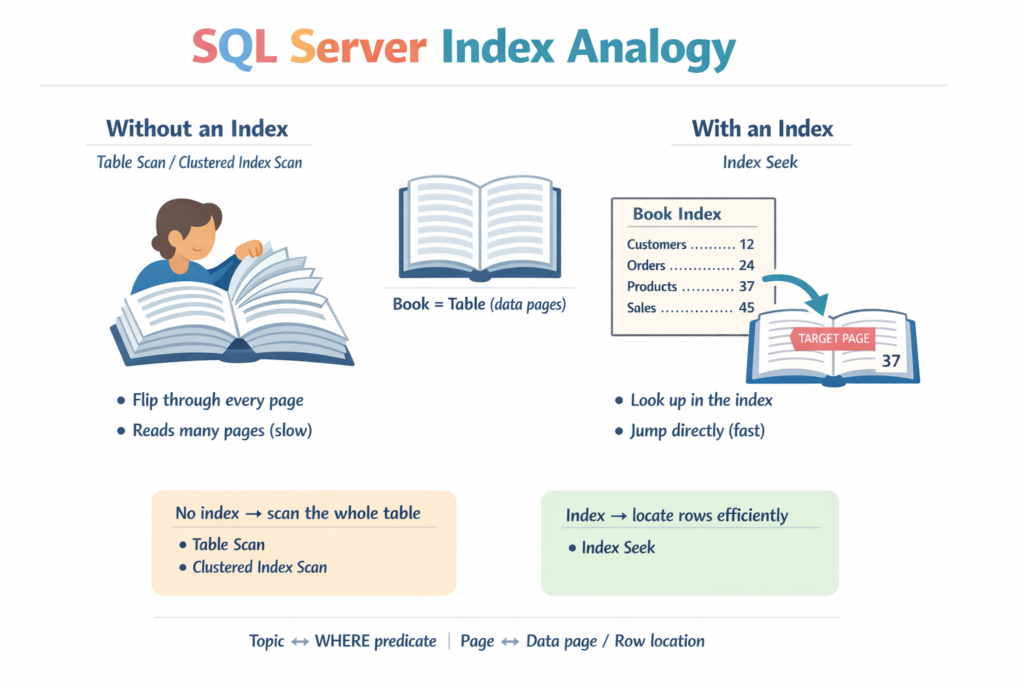
An index in a database is like an index at the back of a book.
- Without an index: To find a topic, you flip through every page. In SQL Server, this is typically a Table Scan (or a Clustered Index Scan).
- With an index: You look up the topic, find the page number, and jump directly to it. In SQL Server, this is typically an Index Seek.
1.2 Setup: Creating sampleDB with Data
To demonstrate index performance, we need a table with a meaningful amount of data. Let’s insert 10,000 rows into a test table.
-- Setup Script
IF NOT EXISTS (SELECT * FROM sys.databases WHERE name = 'sampleDB')
BEGIN
    CREATE DATABASE sampleDB;
END
GO

USE sampleDB;
GO

-- Create a table WITHOUT any keys (Heap)
IF OBJECT_ID('dbo.BigTable', 'U') IS NOT NULL DROP TABLE dbo.BigTable;
CREATE TABLE dbo.BigTable (
    ID int,
    Name varchar(50),
    City varchar(50),
    CreatedDate date,
    IsActive bit
);

-- Start clean (optional)
TRUNCATE TABLE dbo.BigTable;
GO

-- Insert 10,000 rows of dummy data
DECLARE @i int = 1;
WHILE @i <= 10000
BEGIN
    INSERT INTO dbo.BigTable VALUES (
        @i,
        'User' + CAST(@i AS varchar),
        CASE WHEN @i % 5 = 0 THEN 'New York' ELSE 'London' END,
        DATEADD(day, @i % 365, '2024-01-01'),
        CASE WHEN @i % 10 = 0 THEN 0 ELSE 1 END -- 90% Active, 10% Inactive
    );
    SET @i += 1;
END
GO
STEP 2. Index Basics
2.1 How Search Works Without Indexes
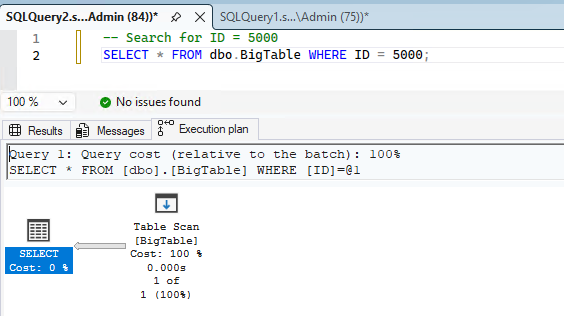
Currently, dbo.BigTable is a Heap (no clustered index).
-- Search for ID = 5000
SELECT * FROM dbo.BigTable WHERE ID = 5000;
Result: SQL Server reads many/all pages (Table Scan) because it doesn’t have a fast path to locate ID = 5000.
2.2 Creating Indexes: CREATE INDEX
Let’s create a nonclustered index on the ID column.
-- Syntax: CREATE INDEX [IndexName] ON [TableName]([ColumnName])
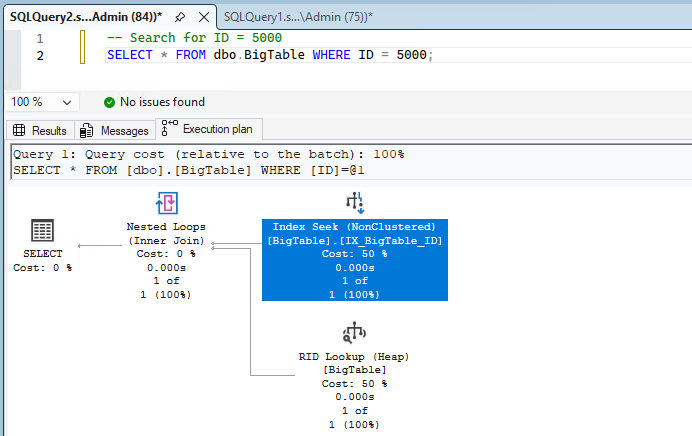
CREATE INDEX IX_BigTable_ID ON dbo.BigTable(ID);
After creating the index, run the same query again. You can see the index is used in the execution plan.
2.3 Internal Structure (B-Tree)
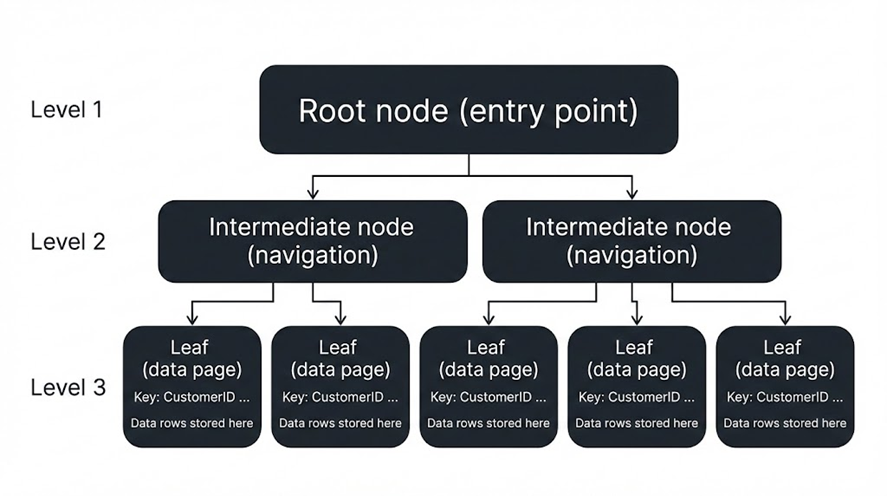
Most “rowstore” indexes in SQL Server are stored as a Balanced Tree (B-Tree) structure.
- Root node: The entry point.
- Intermediate nodes: Navigation (like a directory).
- Leaf level: The final level that contains the key and a pointer (or the data itself for clustered indexes).
This allows SQL Server to find matching rows in a small number of logical reads—even when the table grows.
2.4 Disabling and Deleting Indexes
-- Disable
ALTER INDEX IX_BigTable_ID ON dbo.BigTable DISABLE;

-- Rebuild (Enable again)
ALTER INDEX IX_BigTable_ID ON dbo.BigTable REBUILD;

-- Drop (Delete)
DROP INDEX IX_BigTable_ID ON dbo.BigTable;
Note: Even if an index is disabled, rebuilding it will enable it again.
STEP 3. Deep Dive: Types of Indexes
3.0 Heap (No Clustered Index)
A Heap is a table that has no clustered index. Rows are not stored in any defined order.
- Pros: very fast inserts in some scenarios (especially append-only).
- Cons: lookups and range queries can be expensive; forwarded records may appear after updates.
-- This table is currently a heap
SELECT i.name, i.type_desc
FROM sys.indexes i
WHERE i.object_id = OBJECT_ID('dbo.BigTable');
3.1 Clustered vs Nonclustered
Understanding this difference is crucial because it affects both storage and how SQL Server retrieves columns.
- Clustered index:
- The data rows are stored in the order of the clustered key.
- The leaf level contains the acutual table data (it contains the full row).
- Only one clustered index per table.
- Nonclustered index:
- A separate B-tree structure with keys and a locator to the base row.
- The leaf level contains the key + a locator (RID for heaps, clustered key for clustered tables).
- You can create many nonclustered indexes (the practical limit depends on your workload and storage).
To make this concrete, consider the following simple table and sample data. We insert 100,000 rows so that the optimizer can clearly choose different plans depending on the index design.
USE sampleDB;
GO

-- Create the table (if it does not exist)
IF OBJECT_ID('dbo.t1', 'U') IS NULL
BEGIN
    CREATE TABLE dbo.t1
    (
        id int NOT NULL,
        c1 nvarchar(1024) NULL,
        c2 int NULL
    );
END
GO

-- Start clean
TRUNCATE TABLE dbo.t1;
GO

;WITH N AS
(
    SELECT TOP (100000)
           ROW_NUMBER() OVER (ORDER BY (SELECT NULL)) AS n
    FROM sys.all_objects a
    CROSS JOIN sys.all_objects b
)
INSERT INTO dbo.t1 (id, c1, c2)
SELECT
    n AS id,
    CONCAT(N'Row ', n, N' - ', REPLICATE(N'x', 50)) AS c1,
    ((n - 1) % 1000) + 1 AS c2
FROM N
ORDER BY n;
GO
Now create:
- a clustered index on
id - a nonclustered index on
c2
-- Clustered index on id
CREATE CLUSTERED INDEX CX_t1_id
ON dbo.t1 (id);

-- Nonclustered index on c2
CREATE NONCLUSTERED INDEX IX_t1_c2
ON dbo.t1 (c2);
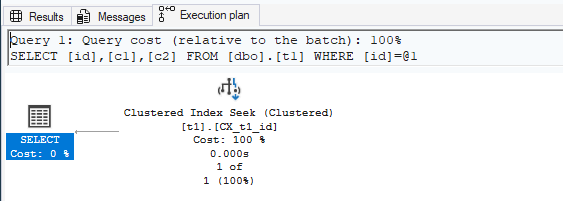
What the clustered index stores:
Because this is a clustered table, the leaf level of CX_t1_id contains the full data rows (values for id, c1, and c2).
So, for a query like this:
SELECT id, c1, c2
FROM dbo.t1
WHERE id = 1;
SQL Server can locate id = 1 using the clustered index, and return id, c1, and c2 using only the clustered index pages (no extra lookup is needed).
What the nonclustered index stores:
A nonclustered index does not automatically contain every column. Its leaf level contains:
- the key column(s) (here:
c2) - the row locator (for clustered tables: the clustered key, here:
id) - optional included columns (only if you use
INCLUDE)
So, for this query:
SELECT id, c1, c2
FROM dbo.t1
WHERE c2 = 1;
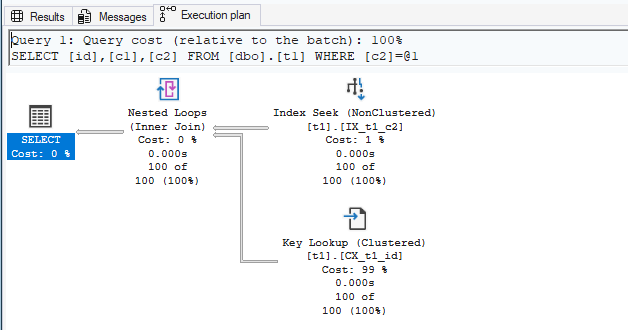
SQL Server may do the following:
- Use
IX_t1_c2to find entries wherec2 = 1. - From each matching entry, read the stored clustered key value (
id). - Use that
idto navigate intoCX_t1_idand fetch missing columns (such asc1).
This extra step—going from a nonclustered index to the clustered index to fetch additional columns—is called a Key Lookup. (If the table is a heap, this is called a RID Lookup.)
You may have already noticed this: if the query does not need columns such as id or c1, then a Key Lookup is not required.
SELECT c2
FROM dbo.t1
WHERE c2 = 1;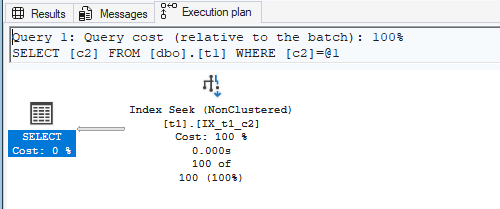
Later, we will discuss why many lookups can become a bottleneck, and how to reduce them (for example, by making the nonclustered index covering using INCLUDE).
3.2 Unique Indexes
A Unique index enforces “no duplicates” on the key.
- Can be unique clustered or unique nonclustered.
- Often used to enforce business rules (e.g., Email must be unique).
-- Unique Nonclustered Index example
CREATE UNIQUE INDEX UX_BigTable_Name ON dbo.BigTable(Name);
Unique vs. Clustered:
A clustered index is about how the table data is organized (the leaf level is the data). A unique index is about enforcing uniqueness (no duplicate key values). You can have a unique clustered index, a unique nonclustered index, or a non-unique clustered index depending on your design requirements.
PRIMARY KEY vs. UNIQUE:
When a PRIMARY KEY is defined, the column(s) cannot be NULL. With a UNIQUE constraint, NULL is allowed. However, SQL Server allows only one NULL value per column under a UNIQUE constraint (because NULL is treated like any other value for uniqueness enforcement).
3.3 Composite (Multi-Column) Indexes
A Composite index uses multiple columns in the key.
- It is very effective when queries filter, join, sort, or group by the leading columns of the index.
- The goal is to increase the number of predicates that can be satisfied by an Index Seek (e.g., WHERE / JOIN / ORDER BY / GROUP BY).
- Because the goal is “better searching,” a Key Lookup (or RID Lookup) may still occur depending on which columns the query needs to return.
- Column order matters: (A, B) is not the same as (B, A). This is because the B-tree is ordered by the key in left-to-right order (for example, (City → CreatedDate)). SQL Server can efficiently narrow down rows by City first, and then further filter within that subset by CreatedDate.
-- Composite index example
CREATE INDEX IX_BigTable_City_CreatedDate
ON dbo.BigTable(City, CreatedDate);
3.4 Covering Indexes & INCLUDE
If a query needs columns that are not present in the index, SQL Server may perform a Key Lookup (or a RID Lookup). A Covering Index includes all columns needed by the query, so SQL Server can return the result without going back to the base table (often using INCLUDE to keep the key small).
IF EXISTS (SELECT 1 FROM sys.indexes WHERE object_id = OBJECT_ID('dbo.BigTable') AND name = 'IX_BigTable_Name')
    DROP INDEX IX_BigTable_Name ON dbo.BigTable;
GO

CREATE NONCLUSTERED INDEX IX_BigTable_Name
ON dbo.BigTable (Name);
GO

-- Query: Search by Name, return City
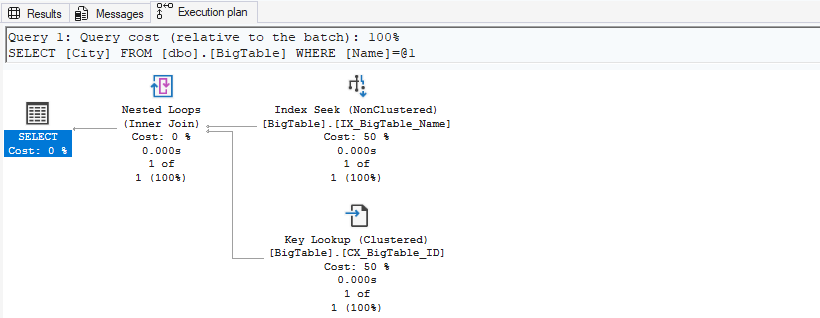
SELECT City FROM dbo.BigTable WHERE Name = 'User100';
In this case, there is no covering index. This means that if you select columns other than Name (in this case, City), a lookup will occur.
Next, drop the index and then create a covering index.
DROP INDEX IX_BigTable_Name ON dbo.BigTable;
GO

CREATE NONCLUSTERED INDEX IX_BigTable_Name_IncludeCity
ON dbo.BigTable (Name)
INCLUDE (City);
GO

-- Query: Search by Name, return City
SELECT City FROM dbo.BigTable WHERE Name = 'User100';
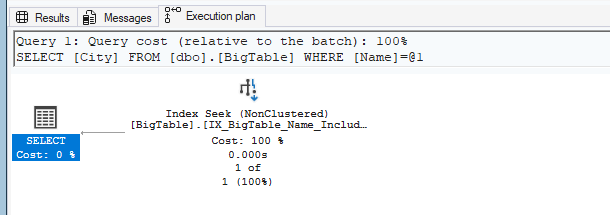
In this case, the index IX_BigTable_Name_IncludeCity stores not only Name but also City. Therefore, SQL Server does not need to perform a lookup.
3.5 Filtered Indexes
A Filtered Index is a nonclustered index that stores only a subset of rows defined by a WHERE clause in the index definition.
- Better query performance and plan quality when your queries target a small subset of rows.
Filtered indexes are smaller, and they also create filtered statistics that can be more accurate for that subset. - Lower maintenance cost: the index is maintained only when DML affects rows that qualify for the filter,
and smaller indexes are cheaper to update and to keep statistics up to date. - Lower storage cost: you avoid indexing rows you never (or rarely) search for. In some designs, you can replace a single full-table index with one or more filtered indexes without significantly increasing storage.
-- Example 1: Mostly NULL column
CREATE INDEX IX_BigTable_SomeNullable_NotNull
ON dbo.BigTable(SomeNullableCol)
WHERE SomeNullableCol IS NOT NULL;
3.6 Columnstore Indexes (Clustered / Nonclustered)
With traditional indexes (rowstore), data is stored and accessed in a row-oriented format. As a result, even when a query needs only specific columns, SQL Server may still read pages that contain other columns as well. If you do not need all columns in the table, this can cause unnecessary I/O and become inefficient. With a columnstore index, data is stored by column. Because columns are stored separately, queries that read specific columns do not need to read other columns, which can improve performance in some scenarios.
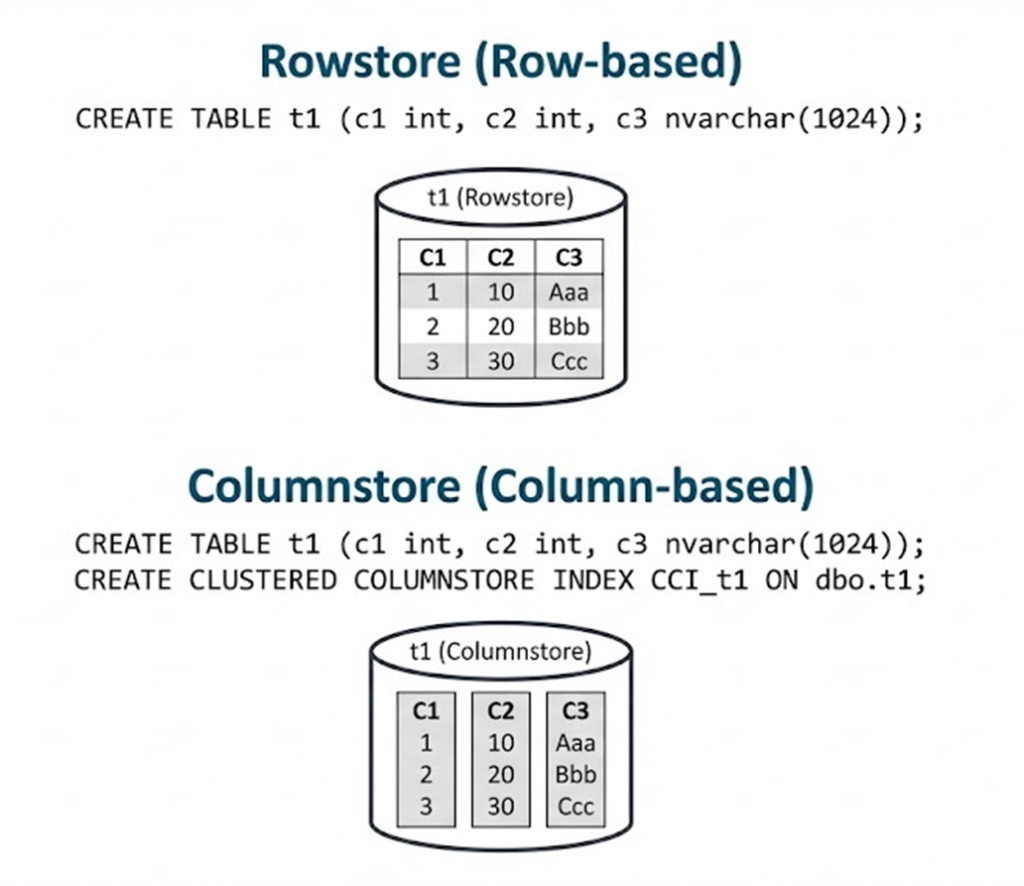
- Clustered Columnstore Index (CCI): typically used for data warehouse fact tables (the table becomes columnstore).
- Nonclustered Columnstore Index (NCCI): adds a columnstore structure on top of an existing rowstore table.
-- Nonclustered Columnstore Index (analytics on selected columns)
CREATE NONCLUSTERED COLUMNSTORE INDEX IX_BigTable_NCCI
ON dbo.BigTable (City, CreatedDate, IsActive);
-- Clustered Columnstore Index (turns the table into columnstore)
-- (Use carefully: best for OLAP / large scans & aggregations)
CREATE CLUSTERED COLUMNSTORE INDEX CCI_BigTable
ON dbo.BigTable;Rule of thumb: Use columnstore for heavy aggregations over large data. Use rowstore (B-Tree) for OLTP point lookups and short transactions.
3.7 Full-Text Indexes
A Full-Text Index enables advanced text search (word-based search, inflectional forms, etc.) using CONTAINS / FREETEXT.
- Requires Full-Text Search feature and a Full-Text Catalog.
- Use it for “search by words” scenarios (not exact equality lookups).
-- Example (simplified): Full-Text requires a unique key index
-- 1) Create a unique key (if you don't have one)
CREATE UNIQUE INDEX UX_BigTable_ID ON dbo.BigTable(ID);

-- 2) Create a full-text catalog
CREATE FULLTEXT CATALOG FTC_Sample AS DEFAULT;

-- 3) Create the full-text index on a text column
CREATE FULLTEXT INDEX ON dbo.BigTable(Name)
KEY INDEX UX_BigTable_ID
WITH STOPLIST = SYSTEM;
3.8 Spatial Indexes
Spatial indexes optimize queries on geometry / geography data types (distance, intersection, containment, etc.).
- Common in map/location scenarios.
- Requires spatial columns (not applicable to our current sample table).
-- Example (illustrative)
-- CREATE SPATIAL INDEX IX_Location_Geo
-- ON dbo.LocationTable(GeoColumn);
3.9 XML Indexes (Primary / Secondary)
XML indexes help query performance for xml columns (XQuery).
- Primary XML Index: foundation index required before creating secondary XML indexes.
- Secondary XML Indexes: specialized types:
- PATH (path expressions)
- VALUE (value-based lookups)
- PROPERTY (property/attribute queries)
-- Example (illustrative)
-- CREATE PRIMARY XML INDEX PX_YourTable_Xml
-- ON dbo.YourTable(XmlCol);

-- CREATE XML INDEX SX_YourTable_Xml_Path
-- ON dbo.YourTable(XmlCol)
-- USING XML INDEX PX_YourTable_Xml FOR PATH;
3.10 In-Memory OLTP Indexes (Hash / Nonclustered)
For Memory-Optimized Tables (In-Memory OLTP), indexes are different:
- Hash Index: excellent for equality predicates (e.g.,
WHERE Key = ?). Not for range scans. - Nonclustered index (memory-optimized): supports range queries more efficiently than hash.
-- Example (illustrative): Memory-optimized tables require special syntax and options.
-- CREATE TABLE dbo.InMemTable
-- (
--   ID int NOT NULL PRIMARY KEY NONCLUSTERED,
--   Name nvarchar(100) NOT NULL,
--   INDEX IX_InMem_Hash HASH (Name) WITH (BUCKET_COUNT = 1024)
-- )
-- WITH (MEMORY_OPTIMIZED = ON, DURABILITY = SCHEMA_AND_DATA);
STEP 4. Execution Plans (The “Truth”)
How do you know if your index is working? You must check the Execution Plan.
4.1 How to View Execution Plans
In SSMS:
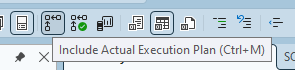
1. Click “Include Actual Execution Plan” (or press Ctrl + M).
2. Run your query.
3. Open the “Execution Plan” tab next to the Results tab.

4.2 Scan vs Seek
Look at the operators in the plan (read from right to left).
| Operator | Meaning | Typical Performance |
|---|---|---|
| Table Scan / Clustered Index Scan | Reads a large portion (or all) of the table/index. | Often slower (but can be OK for small tables or large result sets) |
| Index Seek / Clustered Index Seek | Pinpoints rows using the index structure. | Often faster for selective queries |
Important: “Seek is always better than Scan” is not always true. The best plan depends on the number of rows returned and the cost to retrieve them.
4.3 Key Lookup / RID Lookup (The Hidden Cost)
If you see a Key Lookup (clustered table) or RID Lookup (heap), it means:
- Your nonclustered index helped find the row(s),
- But the query needed extra columns not available in the index,
- So SQL Server did extra reads to fetch the remaining columns.
Common fix: Add INCLUDE columns to make the index covering (See Step 3.4).
4.4 How to Confirm “Which Index Was Used”
In the execution plan, click the operator (e.g., Index Seek). In the Properties pane, look for:
- Object: which table/index the operator used
- Seek Predicates / Predicate: what conditions were applied
- Actual Number of Rows: what really happened vs estimates
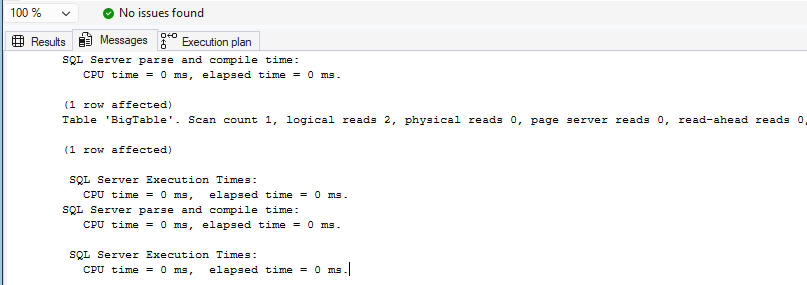
You can also enable IO/time statistics to validate improvements:
SET STATISTICS IO ON;
SET STATISTICS TIME ON;

SELECT City
FROM dbo.BigTable
WHERE Name = 'User100';
Result:
SQL Server parse and compile time:
   CPU time = 0 ms, elapsed time = 0 ms.

(1 row affected)
Table 'BigTable'. Scan count 1, logical reads 2, physical reads 0, page server reads 0, read-ahead reads 0, page server read-ahead reads 0, lob logical reads 0, lob physical reads 0, lob page server reads 0, lob read-ahead reads 0, lob page server read-ahead reads 0.

(1 row affected)

 SQL Server Execution Times:
   CPU time = 0 ms,  elapsed time = 0 ms.
SQL Server parse and compile time:
   CPU time = 0 ms, elapsed time = 0 ms.

 SQL Server Execution Times:
   CPU time = 0 ms,  elapsed time = 0 ms.
STEP 5. Index Maintenance
Over time, INSERT/UPDATE/DELETE operations can cause fragmentation in rowstore indexes.
5.1 What is Fragmentation?
Fragmentation means the logical order of pages does not match the physical order on disk. This can increase I/O for range scans and cause inefficient reads. However, on modern systems, a high index fragmentation percentage rarely causes noticeable performance slowdowns. In many cases, performance issues are more often caused by inefficient execution plans.
5.2 Checking Fragmentation
SELECT
    OBJECT_NAME(object_id) AS TableName,
    index_id,
    index_type_desc,
    avg_fragmentation_in_percent
FROM sys.dm_db_index_physical_stats(DB_ID(), NULL, NULL, NULL, 'LIMITED')
WHERE object_id = OBJECT_ID('dbo.BigTable');
5.3 Rebuild vs Reorganize
| Action | Typical Condition | Description |
|---|---|---|
| REORGANIZE | 5% ~ 30% | Lighter operation. Reorders leaf level pages. Usually online. Execution time can vary depending on the fragmentation level. |
| REBUILD | > 30% | Heavier operation. Drops and recreates the index. Can be offline depending on edition/options. Because rebuilding an index recreates it from scratch, the time required is usually similar when the row count is the same. |
-- Example: rebuild all indexes on the table
ALTER INDEX ALL ON dbo.BigTable REBUILD;

-- Example: reorganize one index
ALTER INDEX IX_BigTable_Name_IncludeCity ON dbo.BigTable REORGANIZE;
5.4 Maintenance Notes (Columnstore / Full-Text / In-Memory)
- Columnstore: fragmentation is not handled the same way as rowstore. Typical tuning involves rowgroup health, delta store, and compression behavior rather than classic page fragmentation.
- Full-Text: maintenance is more about population (incremental/full), stoplists, and tracking changes—different from B-Tree rebuild/reorganize.
- In-Memory OLTP: no classic page fragmentation. Tuning focuses on correct index type (hash vs nonclustered) and appropriate bucket counts for hash indexes.
This concludes No.4 Indexing & Performance.