
Table of Contents
Introduction
When you synchronize data between tables, there are times when you want to confirm whether synchronization has actually completed after the initial sync or after incident recovery, and if synchronization has stalled, which specific records are different.
In SQL Server, you can compare differences using queries (such as EXCEPT) or tablediff.exe, a command-line tool provided as part of replication-related components.
Create Sample Data
Instance 1 (Source example)
- Database:
compareDB_1 - Table:
dbo.t1(id int primary key, c1 nvarchar(10), c2 nvarchar(10)) - Data: Insert ~15 rows
-- Instance 1
IF DB_ID(N'compareDB_1') IS NULL
BEGIN
  CREATE DATABASE compareDB_1;
END
GO

USE compareDB_1;
GO

IF OBJECT_ID(N'dbo.t1', N'U') IS NOT NULL
  DROP TABLE dbo.t1;
GO

CREATE TABLE dbo.t1
(
  id int NOT NULL PRIMARY KEY,
  c1 nvarchar(10) NULL,
  c2 nvarchar(10) NULL
);
GO

INSERT INTO dbo.t1 (id, c1, c2) VALUES
(1,  N'A01', N'X01'),
(2,  N'A02', N'X02'),
(3,  N'A03', N'X03'),
(4,  N'A04', N'X04'),
(5,  N'A05', N'X05'),
(6,  N'A06', N'X06'),
(7,  N'A07', N'X07'),
(8,  N'A08', N'X08'),
(9,  N'A09', N'X09'),
(10, N'A10', N'X10'),
(11, N'A11', N'X11'),
(12, N'A12', N'X12'),
(13, N'A13', N'X13'),
(14, N'A14', N'X14'),
(15, N'A15', N'X15');
GO
Instance 2 (Destination example)
- Database:
compareDB_2 - Table:
dbo.t1(same schema) - Data: Insert ~10 rows (fewer rows, and for some rows the primary key matches but
c1orc2differs)
-- Instance 2
IF DB_ID(N'compareDB_2') IS NULL
BEGIN
  CREATE DATABASE compareDB_2;
END
GO

USE compareDB_2;
GO

IF OBJECT_ID(N'dbo.t1', N'U') IS NOT NULL
  DROP TABLE dbo.t1;
GO

CREATE TABLE dbo.t1
(
  id int NOT NULL PRIMARY KEY,
  c1 nvarchar(10) NULL,
  c2 nvarchar(10) NULL
);
GO

-- Only 10 rows. Make id=3,7,9 "same PK but different values"
INSERT INTO dbo.t1 (id, c1, c2) VALUES
(1,  N'A01', N'X01'),
(2,  N'A02', N'X02'),
(3,  N'A03_DIFF', N'X03'),   -- c1 differs
(4,  N'A04', N'X04'),
(5,  N'A05', N'X05'),
(6,  N'A06', N'X06'),
(7,  N'A07', N'X07_DIFF'),  -- c2 differs
(8,  N'A08', N'X08'),
(9,  N'A09_DIFF', N'X09_DIFF'), -- both c1 and c2 differ
(10, N'A10', N'X10');
GO
Compare Differences 1: Using EXCEPT
EXCEPT returns rows that exist on the left side but do not exist on the right side.
If the databases are on the same SQL Server instance, you can compare directly. If they are on different instances, you need a Linked Server (or an equivalent connectivity method).
Notes
EXCEPTcompares entire rows. Even if the primary key is the same, if any column value differs, both rows appear as differences (one from each side).- When comparing across servers with different collations, you may need
COLLATEfor string columns. - If needed, you can first load remote data into a local temporary table and then compare locally.
Create a Linked Server on Intance 1(Prerequisite)
This linked server is for running query accross instances.
-- Run on Instance 1
-- LinkServer_TO_INSTANCE2 is an arbitrary linked server name
-- Adjust @provider / @datasrc to your environment
EXEC master.dbo.sp_addlinkedserver
  @server     = N'LinkServer_TO_INSTANCE2',
  @srvproduct = N'',
  @provider   = N'MSOLEDBSQL',
  @datasrc    = N'<Instance2 server name or host>\<instance name>';

-- Authentication (example: delegate current login or use a fixed login)
-- Configure based on your operational rules
EXEC master.dbo.sp_addlinkedsrvlogin
  @rmtsrvname = N'LinkServer_TO_INSTANCE2',
  @useself    = N'True';
GO
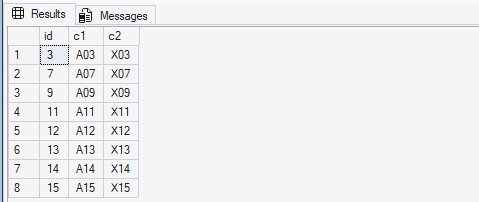
Find differences (Rows in Instance1 but not in Instance2)
-- Run on Instance 1 (example)
SELECT id, c1, c2
FROM compareDB_1.dbo.t1
EXCEPT
SELECT id,
       c1 COLLATE DATABASE_DEFAULT,
       c2 COLLATE DATABASE_DEFAULT
FROM [LinkServer_TO_INSTANCE2].compareDB_2.dbo.t1
ORDER BY id;
Result: Rows that exist in Instance1 but not in Instance2 are returned
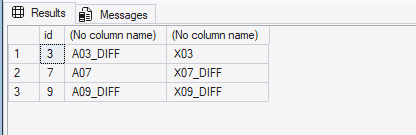
Find differences (Rows in Instance2 but not in Instance1)
-- Run on Instance 1 (example)
SELECT id,
       c1 COLLATE DATABASE_DEFAULT,
       c2 COLLATE DATABASE_DEFAULT
FROM [LinkServer_TO_INSTANCE2].compareDB_2.dbo.t1
EXCEPT
SELECT id, c1, c2
FROM compareDB_1.dbo.t1
ORDER BY id;
Result: Rows that exist in Instance2 but not in Instance1 are returned
Compare Differences 2: Using tablediff.exe
tablediff.exe is a command-line tool provided for troubleshooting non-convergence in replication environments.
By using tablediff.exe, you can detect differences between two tables, output results, and (optionally) generate a T-SQL script to fix differences.
Where tablediff.exe is located
- SQL Server 2022:
C:\Program Files\Microsoft SQL Server\160\COM - SQL Server 2025:
C:\Program Files\Microsoft SQL Server\170\COM
Notes
- If replication components are not installed,
tablediff.exemay not exist on the server. - The source table must have at least one of the following:
– Primary key
– IDENTITY column
– ROWGUID column
SQL Server 2025 execution example (PowerShell command sample)
cd "C:\Program Files\Microsoft SQL Server\170\COM"

.\tablediff.exe `
  -sourceserver <source server name> `
  -sourcedatabase <source database name> `
  -sourceschema <source schema name> `
  -sourcetable <source table name> `
  -destinationserver <destination server name> `
  -destinationdatabase <destination database name> `
  -destinationschema <destination schema name> `
  -destinationtable <destination table name> `
  -f <output path and file name>
The -f option generates a T-SQL script that makes the destination table converge to the source table (i.e., makes Instance2 match Instance1).
Example against the sample tables
cd "C:\Program Files\Microsoft SQL Server\170\COM"

.\tablediff.exe `
  -sourceserver xxx `
  -sourcedatabase compareDB_1 `
  -sourceschema dbo `
  -sourcetable t1 `
  -destinationserver yyy `
  -destinationdatabase compareDB_2 `
  -destinationschema dbo `
  -destinationtable t1 `
  -f C:\temp\output.txt
Output
Microsoft (R) SQL Server Replication Diff Tool
Copyright (c) 2016 Microsoft Corporation

User-specified agent parameter values:
-sourceserver xxx
-sourcedatabase compareDB_1
-sourceschema dbo
-sourcetable t1
-destinationserver yyy
-destinationdatabase compareDB_2
-destinationschema dbo
-destinationtable t1
-f C:\temp\output.txt

Table [compareDB_1].[dbo].[t1] on xxx and Table [compareDB_2].[dbo].[t1] on yyy have 8 differences.
Fix SQL written to C:\temp\output.txt.sql.
Err	id	Col
Mismatch	3	c1
Mismatch	7	c2
Mismatch	9	c1 c2
Src. Only	11
Src. Only	12
Src. Only	13
Src. Only	14
Src. Only	15
The requested operation took 0.1093775 seconds.
Generated file (C:\temp\output.txt.sql)
-- Host: yyy
-- Database: [compareDB_2]
-- Table: [dbo].[t1]
UPDATE [dbo].[t1] SET [c1]=N'A03' WHERE [id] = 3
UPDATE [dbo].[t1] SET [c2]=N'X07' WHERE [id] = 7
UPDATE [dbo].[t1] SET [c1]=N'A09',[c2]=N'X09' WHERE [id] = 9
INSERT INTO [dbo].[t1] ([c1],[c2],[id]) VALUES (N'A11',N'X11',11)
INSERT INTO [dbo].[t1] ([c1],[c2],[id]) VALUES (N'A12',N'X12',12)
INSERT INTO [dbo].[t1] ([c1],[c2],[id]) VALUES (N'A13',N'X13',13)
INSERT INTO [dbo].[t1] ([c1],[c2],[id]) VALUES (N'A14',N'X14',14)
INSERT INTO [dbo].[t1] ([c1],[c2],[id]) VALUES (N'A15',N'X15',15)
Key tablediff Options
tablediff provides options such as “quick comparison”, “column-level comparison”, and “script generation”. Below are commonly used options in practice.
| Option | Description |
|---|---|
-Q |
“Quick” comparison that checks only row counts and schema. Useful for an initial yes/no check. |
-c |
Enables column-level comparison. |
-f [file_name] |
Generates a T-SQL script to make the destination table converge to the source. |
-o output_file_name |
Writes the comparison results to an output file (full path). |
-et table_name / -dt |
Writes results to a table in the destination database (-et), and drops it first if it exists (-dt). |
-strict |
Performs stricter schema comparison (reduces implicit type mapping). |
-b large_object_bytes |
Specifies how many bytes to compare for LOB columns (performance tuning). |
-bf number_of_statements |
Splits the generated fix script into multiple files after the specified number of statements. |
-rc / -ri |
Retry count and retry interval (seconds) on failures. |
-t connection_timeouts |
Sets connection timeout (seconds). |
-sourcelocked / -destinationlocked |
Locks the tables during comparison (TABLOCK/HOLDLOCK). Improves consistency but can impact workloads. |
-? |
Shows the list of supported parameters. |
How tablediff Compares Values
When tracing what happens during tablediff execution, you can see that the following query is executed.
Source side:
SELECT [dbo].[t1].[id],BINARY_CHECKSUM([dbo].[t1].[c1],[dbo].[t1].[c2],[dbo].[t1].[id]) as MShash_46104728 FROM [dbo].[t1] WITH (READUNCOMMITTED) ORDER BY [dbo].[t1].[id]
Destination side:
SELECT [dbo].[t1].[id],BINARY_CHECKSUM([dbo].[t1].[c1],[dbo].[t1].[c2],[dbo].[t1].[id]) as MShash_46104728 FROM [dbo].[t1] WITH (READUNCOMMITTED) ORDER BY [dbo].[t1].[id]
After that, you can confirm that the following queries are executed. Based on this behavior, tablediff first converts the relevant columns into a hash value, then for records with different hashes it runs additional queries per key to identify the exact differences.
Source side:
SELECT [dbo].[t1].[c1],[dbo].[t1].[c2],[dbo].[t1].[id] FROM [dbo].[t1] WITH (READUNCOMMITTED) WHERE [id] = 3
SELECT [dbo].[t1].[c1],[dbo].[t1].[c2],[dbo].[t1].[id] FROM [dbo].[t1] WITH (READUNCOMMITTED) WHERE [id] = 7
SELECT [dbo].[t1].[c1],[dbo].[t1].[c2],[dbo].[t1].[id] FROM [dbo].[t1] WITH (READUNCOMMITTED) WHERE [id] = 9
SELECT [dbo].[t1].[c1],[dbo].[t1].[c2],[dbo].[t1].[id] FROM [dbo].[t1] WITH (READUNCOMMITTED) WHERE [id] = 11
SELECT [dbo].[t1].[c1],[dbo].[t1].[c2],[dbo].[t1].[id] FROM [dbo].[t1] WITH (READUNCOMMITTED) WHERE [id] = 12
SELECT [dbo].[t1].[c1],[dbo].[t1].[c2],[dbo].[t1].[id] FROM [dbo].[t1] WITH (READUNCOMMITTED) WHERE [id] = 13
SELECT [dbo].[t1].[c1],[dbo].[t1].[c2],[dbo].[t1].[id] FROM [dbo].[t1] WITH (READUNCOMMITTED) WHERE [id] = 14
SELECT [dbo].[t1].[c1],[dbo].[t1].[c2],[dbo].[t1].[id] FROM [dbo].[t1] WITH (READUNCOMMITTED) WHERE [id] = 15
Destination side:
SELECT [dbo].[t1].[c1],[dbo].[t1].[c2],[dbo].[t1].[id] FROM [dbo].[t1] WITH (READUNCOMMITTED) WHERE [id] = 3
SELECT [dbo].[t1].[c1],[dbo].[t1].[c2],[dbo].[t1].[id] FROM [dbo].[t1] WITH (READUNCOMMITTED) WHERE [id] = 7
SELECT [dbo].[t1].[c1],[dbo].[t1].[c2],[dbo].[t1].[id] FROM [dbo].[t1] WITH (READUNCOMMITTED) WHERE [id] = 9