How to Fix SQL Server Error 9002: A Guide to Identifying the Root Cause with log_reuse_wait_desc
When the transaction log becomes full in SQL Server, Error 9002 occurs.
This typically prevents log-writing operations such as INSERT, UPDATE, and DELETE, causing direct application impact. To recover from 9002, the fastest approach is to check sys.databases.log_reuse_wait_desc and identify why the log cannot be reused (truncated).
Typical error message:
Msg 9002, Level 17, State 2, Line 1
The transaction log for database 'xxx' is full due to 'LOG_BACKUP'.
OR
Msg 9002, Level 17, State 2, Line 1
The transaction log for database 'xxx' is full due to 'LOG_BACKUP' and the holdup lsn is (xxx:xxx:xxx).
This article explains the following as a complete set:
- Transaction log basics (WAL / recovery model / log truncation)
- How to check
log_reuse_wait_desc(the first query to run) - A quick “summary” and “action” for each
log_reuse_wait_descvalue - A practical response flow (checklist) when 9002 occurs
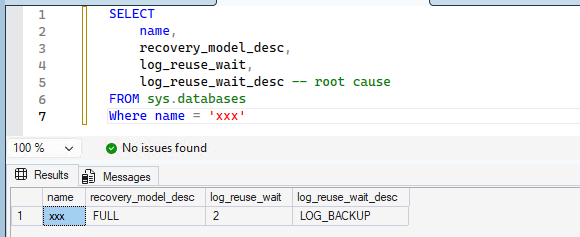
Table of Contents
- 1. What is a transaction log file?
- 2. The views and DMVs to check first
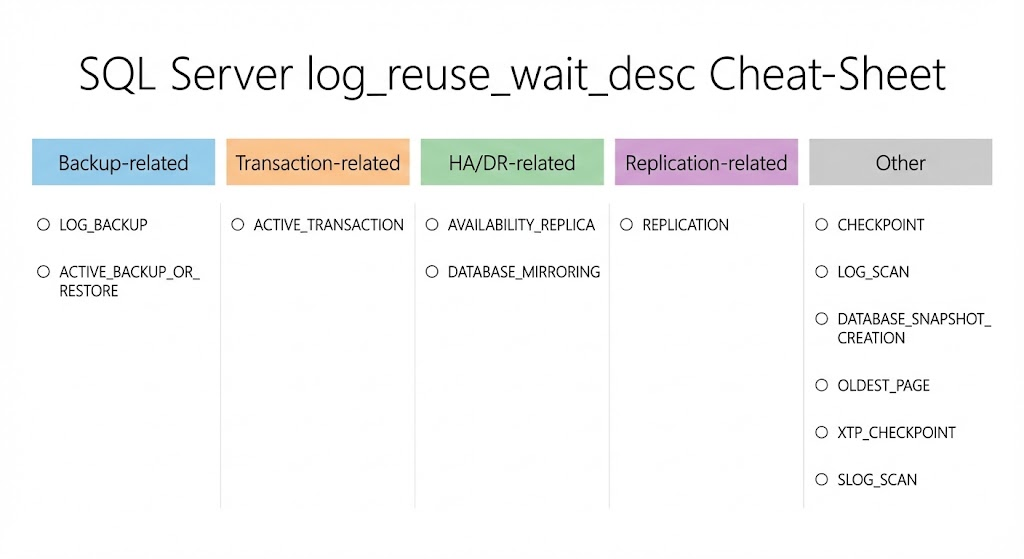
- 3. log_reuse_wait_desc list and quick overview
- 4. Summary and actions for each log_reuse_wait_desc
- 5. Response flow when 9002 occurs
1. What is a transaction log file?
To understand why Error 9002 happens, you need to understand the role of the transaction log in SQL Server. A SQL Server database is mainly composed of two types of files:
- Data files (.mdf / .ndf): store actual data such as tables and indexes
- Transaction log files (.ldf): store the history of data changes (log records)
1-1. How Write-Ahead Logging (WAL) works
SQL Server processes changes using Write-Ahead Logging (WAL). The flow is roughly as follows:
- An application executes
INSERT/UPDATE/DELETE - The change is first written into the in-memory “log buffer”
- The log buffer is flushed to the
.ldfon disk - Later, the data pages (buffer) are written to the
.mdfthrough checkpoints, etc.
The key point is: SQL Server always writes to the log (.ldf) first, and only later writes the data to the data file (.mdf). This enables redo (replay committed work) and undo (rollback incomplete work) during crash recovery.
1-2. The log is truncated and reused
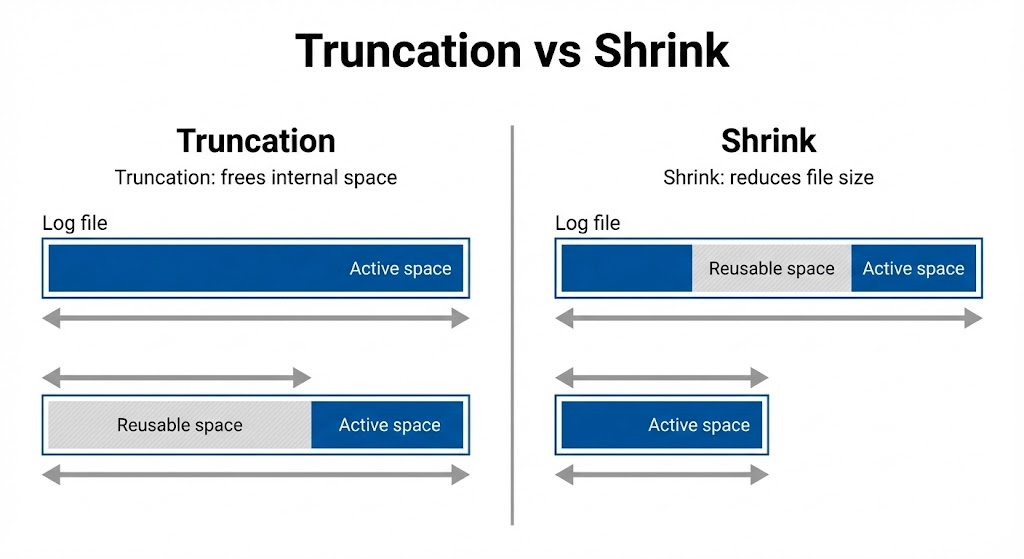
Because the log cannot grow forever, old log records that are no longer needed are released by log truncation and become reusable space inside the log file.
- Log truncation: increases reusable space inside the log
- Log shrink (DBCC SHRINKFILE): reduces the physical file size
1-3. Recovery model and automatic log truncation
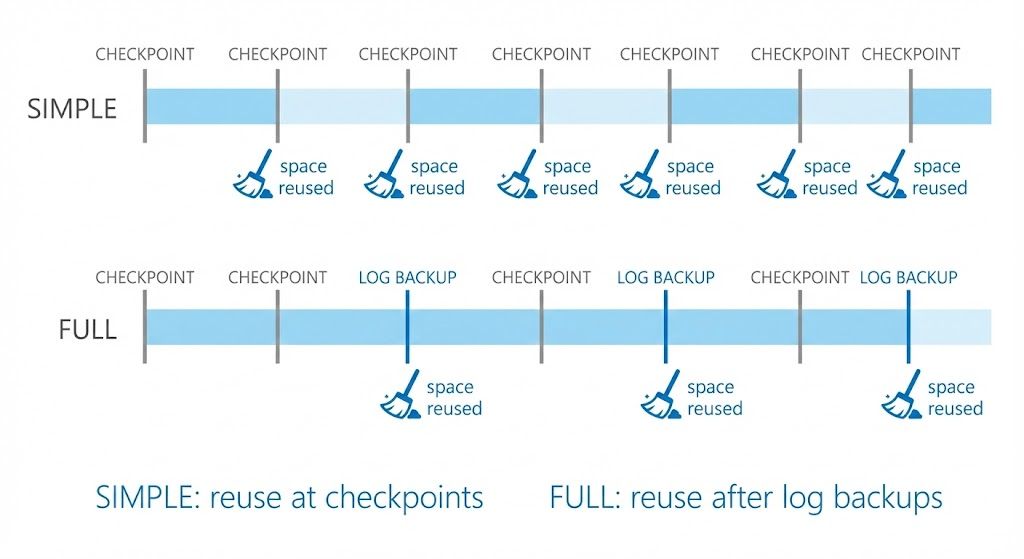
How truncation works depends on the database recovery model.
- SIMPLE: after checkpoints, unnecessary log records are more likely to be truncated automatically (point-in-time restore is not available)
- FULL / BULK_LOGGED: the log is not truncated until you take a log backup (point-in-time restore is available)
One of the most common 9002 causes in the field is: “FULL recovery model but no log backups” (= LOG_BACKUP).
2. The views and DMVs to check first
When dealing with 9002, it is critical to confirm the root cause and then apply actions based on that cause.
Check log_reuse_wait_desc (root cause)
SELECT
    name,
    recovery_model_desc,
    log_reuse_wait,
    log_reuse_wait_desc -- root cause
FROM sys.databases
ORDER BY name;
3. log_reuse_wait_desc list and quick overview
log_reuse_wait_desc indicates why the log cannot be truncated. The values you see depend on the SQL Server version and enabled features (AG/ADR/In-Memory/Replication, etc.). Below are the values you may encounter in the field:
- NOTHING: no internal blocker (but “cannot grow” is a separate issue)
- CHECKPOINT: waiting for a checkpoint to complete (data page flushing cannot keep up, etc.)
- LOG_BACKUP: in FULL/BULK_LOGGED, log backups are not being taken
- ACTIVE_BACKUP_OR_RESTORE: backup/restore is in progress
- ACTIVE_TRANSACTION: a long transaction (or rollback) is holding the log head
- DATABASE_MIRRORING: mirroring partner is behind
- REPLICATION: undistributed log records remain for transactional replication
- DATABASE_SNAPSHOT_CREATION: creating a database snapshot
- LOG_SCAN: log scanning by backup/DBCC, etc.
- AVAILABILITY_REPLICA: AG secondary is behind and prevents truncation
- OLDEST_PAGE: related to indirect checkpoint behavior
- XTP_CHECKPOINT: related to In-Memory OLTP checkpoint processing
- SLOG_SCAN: related to ADR sLog / PVS processing
4. Summary and actions for each log_reuse_wait_desc
Here, we only summarize the typical reason and the practical action points. For 9002 recovery, confirm the cause (log_reuse_wait_desc) and whether you can remove that cause.
4-1. NOTHING
Summary: There is no internal blocker preventing log reuse. If you are still getting 9002 while log_reuse_wait_desc is NOTHING, suspect “cannot grow” causes such as insufficient disk space or MAXSIZE limits.
Actions:
- Check and fix MAXSIZE/autogrowth settings in
sys.database_files - Manually grow the log if disk space is available
4-2. CHECKPOINT
Summary: The log head cannot advance because SQL Server is waiting for checkpoint completion. This can last longer with storage I/O latency or heavy write bursts.
Actions:
- Run
CHECKPOINT;manually - Check I/O latency/queue/bandwidth and remove bottlenecks
- If frequent, redesign updates (split batches, avoid peak hours)
4-3. LOG_BACKUP
Summary: In FULL/BULK_LOGGED, log backups are not being taken (or are failing), so truncation cannot occur. This is one of the most common 9002 causes.
Actions:
- Take a log backup immediately
- Monitor backup destination capacity (confirm log backups are not failing)
- If point-in-time restore is not required, consider switching to SIMPLE
BACKUP LOG YourDatabase
TO DISK = 'D:\Backup\YourDatabase_log_YYYYMMDDHHMM.trn'
WITH INIT, COMPRESSION;
Note: As an emergency workaround, backing up to NUL is possible, but it breaks the log chain.
4-4. ACTIVE_BACKUP_OR_RESTORE
Summary: Log truncation is deferred because a backup/restore is in progress. Long-running large backups can trigger 9002 under heavy write workloads.
Actions:
- In general, wait for completion
- Avoid scheduling heavy backups during high-write peak hours
- If backups take longer than expected, fix bottlenecks at the backup target (share I/O, network bandwidth)
4-5. ACTIVE_TRANSACTION
Summary: A long-running transaction (or rollback) holds the log head and prevents truncation.
Actions:
- Identify the long transaction (DMVs) and resolve the cause (lock waits, app design, user input waits, etc.)
- If needed,
KILLthe session - Change large updates to smaller batch commits
4-6. DATABASE_MIRRORING
Summary: The mirroring partner is behind, so the primary cannot truncate the log.
Actions:
- Return mirroring to a healthy state (resolve SUSPENDED/DISCONNECTED)
- Fix network and mirror-side I/O bottlenecks
4-7. REPLICATION
Summary: For transactional replication, undistributed log records remain in the publication database, blocking truncation on the publisher.
Actions:
- Fix and restart Log Reader Agent errors
- Remove unnecessary publications/subscriptions
- If difficult to resolve, consider reconfiguring replication
4-8. DATABASE_SNAPSHOT_CREATION
Summary: A database snapshot is being created, temporarily deferring truncation. This is usually transient.
Actions:
- In general, wait for completion
- If snapshots are created/dropped frequently, ensure enough log/disk capacity
4-9. LOG_SCAN
Summary: Log scanning is in progress (backup/DBCC, etc.), and truncation is deferred until completion. This is often transient.
Actions:
- Suspect long-running DBCC/backup due to I/O issues
- Check for overly frequent jobs or loops
- Avoid overlapping heavy jobs during peak hours
4-10. AVAILABILITY_REPLICA
Summary: In Always On AG, a secondary replica is behind, preventing log truncation on the primary (lag, disconnect, insufficient performance, etc.).
Actions:
- Confirm the secondary can synchronize; if not, fix the issue
- If synchronization is extremely slow, remove bottlenecks
- Temporarily remove the problematic secondary to allow truncation, then re-sync after recovery
4-11. OLDEST_PAGE
Summary: Related to indirect checkpoints, where old dirty pages remain and log truncation is delayed.
Actions:
- If transient, it often resolves by waiting; in most cases it can be ignored
4-12. XTP_CHECKPOINT
Summary: In databases with In-Memory OLTP (memory-optimized tables), XTP checkpoint-related processing can delay log reuse.
Actions:
- If transient, wait for completion
- Review whether update volume is excessive (design, batching, retention period)
4-13. SLOG_SCAN
Summary: When ADR (Accelerated Database Recovery) is enabled, sLog/PVS processing can temporarily block log reuse.
Actions:
- Confirm ADR status and check for frequent long transactions/rollbacks
- If transient, wait for completion
- If frequent, redesign workload to reduce long transactions
5. Response flow when 9002 occurs
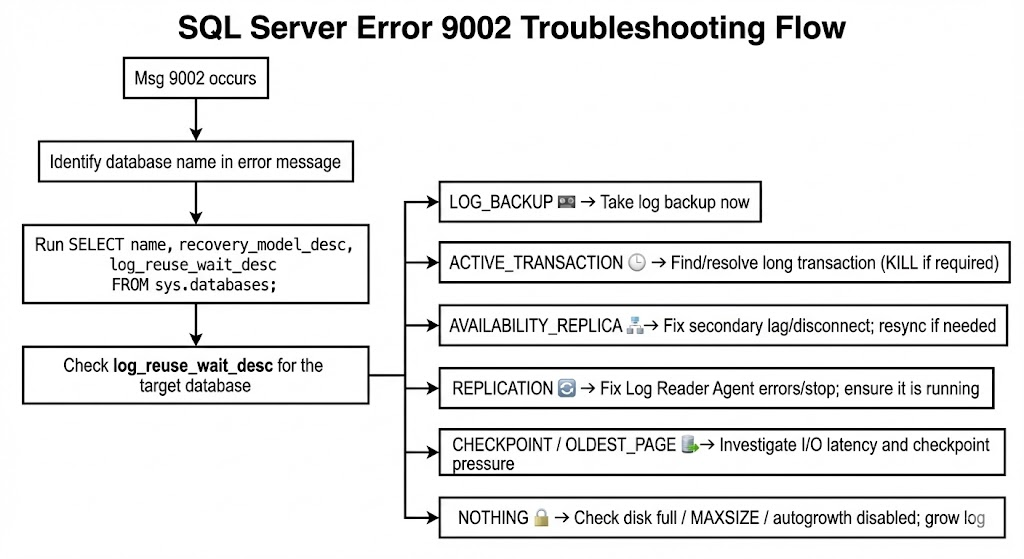
- Identify the target database (database name in the 9002 message)
- Check the root cause:
log_reuse_wait_descinsys.databases - Check the current status:
sys.dm_db_log_space_usage(usage),sys.database_files+ volume free space (can it grow?) - Immediate action (by cause)
- LOG_BACKUP: take a log backup
- ACTIVE_TRANSACTION: identify and resolve long transactions (use
KILLif needed) - AVAILABILITY_REPLICA: fix secondary lag/disconnect issues
- REPLICATION: fix stopped agents/errors
- CHECKPOINT / OLDEST_PAGE: check I/O and checkpoint pressure
- NOTHING but still 9002: prioritize disk full / MAXSIZE / autogrowth disabled
- Prevent recurrence: review backup strategy, batch design, HA/replication health monitoring, and log capacity design (including autogrowth)