Error 665 – The operating system returned error 665(The requested operation could not be completed due to a file system limitation)
SQL Server
When Error 665 occurs in SQL Server, operations such as DBCC CHECKDB, backups, database snapshot operations, and data file expansion can fail, which can have a significant impact on operations.
This error occurs not because of a SQL Server setting, but when the system reaches a file system (mainly NTFS) metadata limitation. The main approach is not “tuning SQL”, but fixing “storage (volume) design and operations”.
Typically, it appears in the SQL Server error log or job history as follows.
Msg 665, Level 16, State xxx, Line xxx
The operating system returned error 665(The requested operation could not be completed due to a file system limitation)
to SQL Server during a write at offset ... in file '...'.
Common timing includes the following.
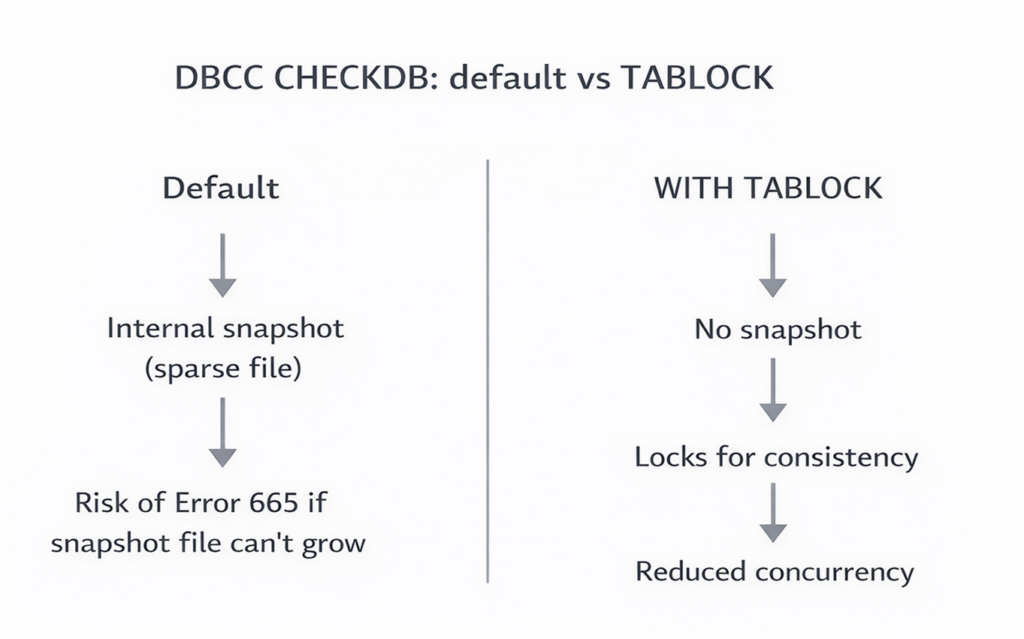
DBCC CHECKDB (the sparse file for the internal snapshot cannot be extended)
Backups (growing a .bak file as a single file, or growing files too frequently in small increments)
Using a database snapshot and performing many changes on the source database
Important: Error 665 is not a SQL Server “logical error”. It is the result of the OS returning “cannot increase this file’s metadata any further”. Restarting SQL Server or updating statistics does not resolve it.
2. Cause
2.1 Exhaustion of NTFS “ATTRIBUTE_LIST”
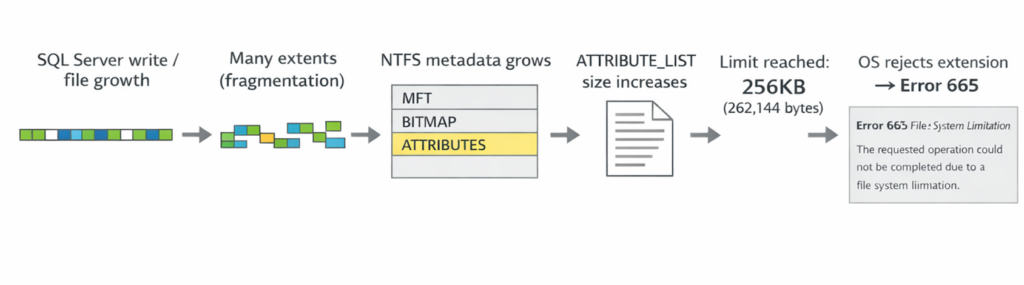
In NTFS, as file fragmentation increases, the management information (metadata) also increases. When fragmentation becomes excessive, the management information accumulates in the ATTRIBUTE_LIST (limit: 256KB). When this limit is reached, the OS rejects further growth, and Error 665 occurs.
The key points are the following two.
Error 665 happens when the OS detects “too many file fragments” at the time of a write
It cannot be avoided only by SQL Server settings; you must change volume design and operations
2.2 What kind of operations increase fragments (extents)?
Auto-growth that is too small (e.g., 10MB, 50MB), causing tens of thousands of growth events
The internal snapshot (sparse file) of DBCC CHECKDB grows on the same volume (the more changes in the DB, the more it grows)
Growing a backup file as a single large file and writing it on a fragmented volume
Create a database snapshot on a large database. Then perform many data changes or maintenance operations on the source database.
If FileSystem is NTFS, the typical pattern (NTFS metadata limitation) is strongly suspected.
3.2 Check “Attribute list size (bytes)” per file
The number you should use for decision-making is “Attribute list size (bytes)”.
Using fsutil file queryoptimizemetadata, you can see the attribute list size.
:: Run in an Administrator Command Prompt
fsutil file queryoptimizemetadata "E:\MSSQL\Data\YourFile.mdf"
Example output (conceptual):
Attribute list size : 448 (0x1c0)
Decision criteria
Attribute list size ≥ 256KB (262,144 bytes)
→ Limit reached (= a level where 665 can occur / likely already occurring)
4. Remediation steps
In this section, regardless of the trigger condition (DBCC CHECKDB / backup / snapshot, etc.),
we list the common remediation and workaround options for Error 665 at the same level.
4.1 DBCC CHECKDB WITH TABLOCK (Do not use the internal snapshot)
If you encounter error 665 during running DBCC CHECKDB, TABLOCK is available for workaround.
DBCC CHECKDB (N'YourDB') WITH TABLOCK;
With TABLOCK, DBCC CHECKDB does not create an internal snapshot and instead uses locks to ensure consistency. However, because it includes short exclusive locks, concurrency is reduced. Also, TABLOCK has limitations on what is checked (for example, CHECKCATALOG is not executed).
Operational guidance: TABLOCK is a method to avoid snapshot creation in exchange for business impact. Do not run it during time periods that require online concurrency.
4.2 Change the volume to ReFS (or migrate to another ReFS volume)
ReFS (Resilient File System) does not have the ATTRIBUTE_LIST_ENTRY limitation. Therefore, changing from NTFS to ReFS can address this issue.
Prerequisites
ReFS can be adopted for the location of SQL Server data/log files
Moving the data files is required during migration (downtime occurs)
Steps
Prepare the destination storage and format it with ReFS.
Move the data files. This requires database offline/online operations and copying the database files.
4.3 If you continue to use NTFS: Large File Record (/L)
If you continue using NTFS, enabling Large size file records (Large FRS) increases the metadata limit and extends the time before reaching Error 665. This is not “unlimited”, but a design to delay reaching the limit.
Prerequisites
Reformatting is required (= data on the volume must be evacuated first)
You can secure downtime (service interruption)
Steps (command examples)
After evacuating existing data, recreate NTFS using the format command with /L and /A:64K.
:: Example (Recreate E:. All data will be deleted, so evacuation is required)
format E: /FS:NTFS /A:64K /L
If using PowerShell, Format-Volume with -UseLargeFRS is available.
Defragmentation reduces file fragments (extents). However, if SQL Server data files are open, they cannot be sufficiently rearranged. Run this with SQL Server stopped.
Prerequisites
The storage is HDD
You can stop the SQL Server service
There is enough free space on the volume (if free space is low, rearrangement is not possible)
Steps
Take a full backup.
Stop the SQL Server service (Database Engine).
Run analysis and optimization from an Administrator Command Prompt.
Check Attribute list size again using fsutil file optimizemetadata /a.
Run DBCC CHECKDB again and verify whether 665 is gone.
Note: Defragmentation does not prevent recurrence. If small auto-growth and low free space continue, extents will increase again and the same issue will recur.
4.5 Move (copy) to another volume to “reset” fragmentation
When fragmentation becomes excessive, small changes on the same volume may not improve it. For higher certainty, moving (copying) to another volume and allowing it to be placed in more contiguous space is practical.
Prerequisites
The destination volume has enough free space
You can perform stop/offline/switchover steps (= downtime)
Steps
Take a full backup.
Take the target DB offline.
Move the data files and log files to another volume.
Bring the DB online.
Re-check Attribute list size and complete DBCC CHECKDB.
5. Impact of each remediation
Remediation
Downtime
Certainty of effect
Notes
DBCC CHECKDB WITH TABLOCK (workaround)
None (but business impact during execution)
High as a DBCC workaround
Reduced concurrency; some checks are limited
Migrate to ReFS
Yes (data evacuation required)
High
If using the same disk, formatting is required. Confirm compatibility with products/operations
Reformat NTFS (/L)
Yes (data evacuation required)
High (life-extension effect)
Not unlimited. Poor operations can cause recurrence
Defrag (offline, HDD)
Yes
Medium (depends on conditions)
Does not prevent recurrence. Low free space reduces effectiveness