
DBA PARK may earn a commission from purchases through links in this article, at no extra cost to you.
Welcome to No.3 of our SQL Server series. In the previous posts, we covered Installation (No.1) and SQL Fundamentals (No.2).
What’s different about No.3? No.2 focused on the fundamentals of querying—how to read and shape data using SELECT, WHERE, JOIN, GROUP BY, and basic T-SQL syntax. In No.3, we shift to SQL Server programmability: writing reusable, controllable, and safer server-side logic.
In this post, we move from “writing queries” to “building logic.” Transact-SQL (T-SQL) adds procedural programming capabilities—variables, loops, conditional logic, error handling, stored procedures, user-defined functions, and dynamic SQL—transforming SQL Server from a simple data store into a powerful application platform for automation and business rules.
In this programmability-focused guide, you will learn how to use variables, flow control, transaction error handling, stored procedures, dynamic SQL, collation, data types, functions (including user-defined functions), temporary tables, table variables, and CTEs (including recursive queries) to write more powerful and maintainable SQL Server scripts.
Table of Contents
- STEP 1. Programmability Overview & Environment Setup
- STEP 2. Programmability Building Blocks
- STEP 3. Flow Control
- STEP 4. Transaction Error Handling
- STEP 5. Stored Procedures
- STEP 6. Dynamic SQL
- STEP 7. Collation (Sorting Rules)
- STEP 8. Data Types
- STEP 9. Functions
- STEP 10. Temporary Objects & Advanced Queries
STEP 1. Programmability Overview & Environment Setup
In this step, you will learn:
- Where T-SQL programmability fits in SQL Server (scripts, procedures, functions).
- How to create a simple practice database
sampleDBand table.
1.1 T-SQL Programmability: What You Can Build
Transact-SQL (T-SQL) is Microsoft’s extension to standard SQL (ANSI SQL). Beyond querying, it enables programmability—server-side logic you can reuse, control, and secure.
- Procedural Logic: Variables,
IFstatements, and loops. - Error Handling:
TRY...CATCHblocks and transaction control. - Reusable Components: Stored procedures and user-defined functions.
- Dynamic SQL: Building and executing SQL text at runtime.
- System Functions: Advanced date, string, and math operations.
In other words, No.3 is about using T-SQL to create maintainable database logic, not learning SQL syntax from scratch.
1.2 Setup: Creating the sampleDB
We will create a simple database named sampleDB to practice the scripts in this tutorial.
-- Setup Script
IF NOT EXISTS (SELECT * FROM sys.databases WHERE name = 'sampleDB')
BEGIN
    CREATE DATABASE sampleDB;
END
GO

USE sampleDB;
GO

-- Create a dummy table for testing
IF OBJECT_ID('dbo.TestTable', 'U') IS NOT NULL DROP TABLE dbo.TestTable;

CREATE TABLE dbo.TestTable (
    ID  int PRIMARY KEY,
    Val varchar(50)
);

INSERT INTO dbo.TestTable (ID, Val)
VALUES (1, 'A'), (2, 'B'), (3, 'C');
GO
STEP 2. Programmability Building Blocks
In this step, you will learn:
- How to declare and use variables in T-SQL.
- How batches (
GO) affect variable scope. - Important syntax rules: semicolons and comments.
- How to output messages with
PRINTfor debugging.
2.1 Variables (DECLARE, SET, Initial Values)
In T-SQL, local variables are prefixed with an @ symbol. You must declare them before use.
Basic Declaration and Assignment
-- 1. Declare
DECLARE @MyMessage varchar(50);
DECLARE @MyNumber  int;

-- 2. Set Values
SET @MyMessage = 'Hello T-SQL';
SET @MyNumber  = 100;

-- 3. Use the variables
SELECT @MyMessage AS Msg, @MyNumber AS Num;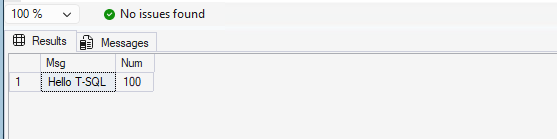
Initial Value Assignment & Multiple Declaration
You can assign values directly during declaration and declare multiple variables at once.
-- Assign initial value
DECLARE @Counter int = 0;

-- Declare multiple variables with initial values
DECLARE @FirstName varchar(20) = 'John',
        @LastName  varchar(20) = 'Doe';
2.2 Batches (GO) and Scope
Variables are local to the batch. The GO command is a batch separator used by SSMS. A variable declared in one batch cannot be accessed in the next.
DECLARE @x int = 10;
SELECT @x AS ValueInFirstBatch;
GO

-- The variable @x ceases to exist here.
-- The following line would cause an error:
SELECT @x AS ValueInSecondBatch;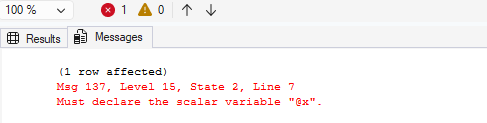
Common Pitfall in STEP 2:
- Expecting variables to be available after a
GObatch separator. Each batch has its own scope.
2.3 Syntax Rules (Semicolons & Comments)
- Semicolons (
;): While optional in many older T-SQL statements, it is best practice to use them consistently. Some newer features (like CTEs orMERGE) require them. - Comments: Use
--for single lines and/* ... */for multiple lines.
-- Single line comment
SELECT *
FROM dbo.TestTable;  -- Statement ends with semicolon

/*
   Multi-line comment
   This query returns all rows
*/
SELECT ID, Val
FROM dbo.TestTable;
2.4 Output (PRINT)
The PRINT statement returns a text message to the “Messages” tab in SSMS. It is very useful for debugging scripts.
PRINT 'Starting the process...';

DECLARE @Step int = 1;
PRINT 'Current step = ' + CAST(@Step AS varchar(10));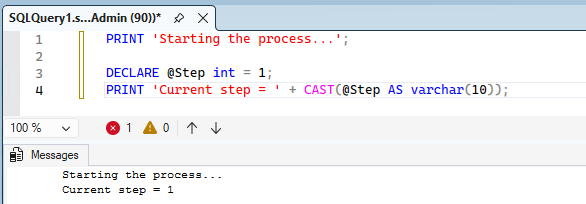
STEP 3. Flow Control
In this step, you will learn:
- How to use
IF...ELSEfor conditional logic. - How to check for the existence of rows with
IF EXISTS. - How to use the
CASEexpression inside queries. - How to loop with
WHILEand pause execution withWAITFOR.
3.1 Conditional Logic (IF…ELSE)
Use IF and ELSE to execute code based on conditions. If you need to execute multiple lines, wrap them in BEGIN...END.
DECLARE @Score int = 85;

IF @Score >= 80
    PRINT 'Excellent!';
ELSE IF @Score >= 60
    PRINT 'Good.';
ELSE
BEGIN
    PRINT 'Needs Improvement.';
    PRINT 'Study harder!';
END;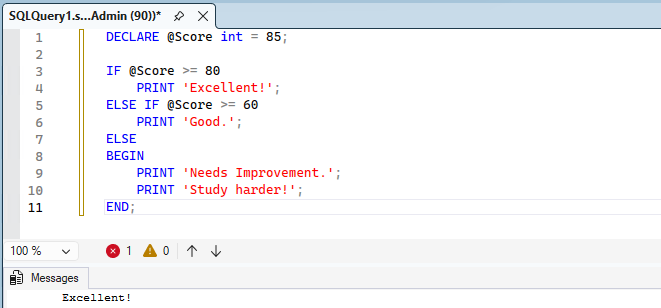
3.2 IF EXISTS
Checking if a record exists is a very common pattern in database programming.
IF EXISTS (SELECT 1 FROM dbo.TestTable WHERE ID = 1)
    PRINT 'ID 1 exists.';
ELSE
    PRINT 'ID 1 not found.';
3.3 CASE Expression
The CASE expression evaluates a list of conditions and returns one of multiple possible result expressions. It is commonly used inside SELECT statements.
SELECT ID, Val,
    CASE Val
        WHEN 'A' THEN 'Alpha'
        WHEN 'B' THEN 'Bravo'
        ELSE 'Other'
    END AS Phonetic
FROM dbo.TestTable;
3.4 Loops (WHILE) & Wait
T-SQL uses WHILE for looping. You can also use WAITFOR DELAY to pause execution.
DECLARE @i int = 1;

WHILE @i <= 5
BEGIN
    PRINT 'Count: ' + CAST(@i AS varchar(10));

    -- Increment operator (+=)
    SET @i += 1;

    -- Wait for 1 second
    WAITFOR DELAY '00:00:01';
END;
Note: Comparison with Oracle PL/SQL
In Oracle PL/SQL, code is typically organized in strictBEGIN ... ENDblocks. In T-SQL,BEGIN ... ENDis primarily used for grouping statements within flow control (IF/WHILE). T-SQL scripts are generally more free-form.
Common Pitfalls in STEP 3:
- Forgetting
BEGIN...ENDwhen multiple statements should run under oneIForWHILE. - Creating a
WHILEloop without a proper exit condition and accidentally causing an infinite loop.
STEP 4. Transaction Error Handling
In this step, you will learn:
- Why error handling is required for safe database programming.
- How to use
TRY...CATCHto capture errors. - How to control transactions with
BEGIN TRAN,COMMIT, andROLLBACK. - How
SET XACT_ABORT ONchanges behavior on runtime errors. - How to raise errors using
RAISERRORandTHROW.
4.1 Why Error Handling Matters
In SQL Server, many scripts do more than one change. For example, you might insert data into multiple tables, or update and then log the operation.
If an error happens in the middle, you usually want to:
- Stop the operation,
- Rollback the transaction,
- Return a clear error to the caller.
4.2 TRY…CATCH Basics
A TRY...CATCH block allows you to capture errors and run recovery logic.
BEGIN TRY
    PRINT 'Inside TRY';
    -- This will cause a divide-by-zero error
    SELECT 1 / 0;
    PRINT 'This line will not run';
END TRY
BEGIN CATCH
    PRINT 'Inside CATCH';

    SELECT
        ERROR_NUMBER()  AS ErrorNumber,
        ERROR_MESSAGE() AS ErrorMessage,
        ERROR_LINE()    AS ErrorLine,
        ERROR_PROCEDURE() AS ErrorProcedure;
END CATCH;
4.3 Transactions (BEGIN / COMMIT / ROLLBACK)
A transaction groups multiple operations into one unit. Either all succeed, or none should apply.
BEGIN TRAN;

UPDATE dbo.TestTable
SET Val = 'Z'
WHERE ID = 1;

-- If everything is OK, commit the changes
COMMIT TRAN;
If an error happens and you want to cancel all changes, use ROLLBACK.
BEGIN TRAN;

UPDATE dbo.TestTable
SET Val = 'Z'
WHERE ID = 1;

-- Cancel the transaction
ROLLBACK TRAN;
Recommended pattern: TRY…CATCH + Transaction
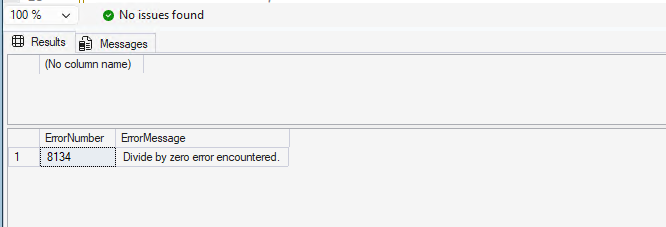
BEGIN TRY
    BEGIN TRAN;

    UPDATE dbo.TestTable
    SET Val = 'X'
    WHERE ID = 2;

    -- Example: force an error
    SELECT 1 / 0;

    COMMIT TRAN;
END TRY
BEGIN CATCH
    -- If a transaction is open, rollback
    IF XACT_STATE() <> 0
        ROLLBACK TRAN;

    -- Return the error
    SELECT
        ERROR_NUMBER()  AS ErrorNumber,
        ERROR_MESSAGE() AS ErrorMessage;
END CATCH;XACT_STATE()returns the transaction state (useful inside CATCH).@@TRANCOUNTreturns the number of active transactions in the session.
4.4 SET XACT_ABORT ON
SET XACT_ABORT ON tells SQL Server: “If a runtime error occurs, automatically rollback the entire transaction.”
This is a common best practice in stored procedures, especially for batch operations.
SET XACT_ABORT ON;

BEGIN TRY
    BEGIN TRAN;

    UPDATE dbo.TestTable
    SET Val = 'Y'
    WHERE ID = 3;

    -- Force an error
    SELECT 1 / 0;

    COMMIT TRAN;
END TRY
BEGIN CATCH
    -- With XACT_ABORT ON, the transaction is typically already aborted.
    IF XACT_STATE() <> 0
        ROLLBACK TRAN;

    SELECT ERROR_MESSAGE() AS ErrorMessage;
END CATCH;
Common Pitfall in STEP 4:
- Forgetting to rollback in the CATCH block, leaving an open transaction that blocks other sessions.
- Assuming that all errors automatically rollback a transaction (not always true unless you control it).
4.5 RAISERROR vs THROW
T-SQL supports two ways to raise an error manually:
RAISERROR: older syntax (still used in many systems).THROW: newer syntax (recommended for modern scripts).
RAISERROR example
DECLARE @Id int = 999;

IF NOT EXISTS (SELECT 1 FROM dbo.TestTable WHERE ID = @Id)
BEGIN
    RAISERROR('ID not found.', 16, 1);
END;
THROW example
DECLARE @Id int = 999;

IF NOT EXISTS (SELECT 1 FROM dbo.TestTable WHERE ID = @Id)
BEGIN
    THROW 50001, 'ID not found.', 1;
END;
Re-throwing the original error inside CATCH
BEGIN TRY
    SELECT 1 / 0;
END TRY
BEGIN CATCH
    -- Re-throw the original error with original details
    THROW;
END CATCH;
STEP 5. Stored Procedures
In this step, you will learn:
- What stored procedures are and why they are commonly used.
- How to create and execute a stored procedure.
- How to pass input parameters.
- How to use output parameters and return codes.
- How to combine stored procedures with
TRY...CATCHand transactions.
5.1 What is a Stored Procedure?
A stored procedure is a saved T-SQL program stored inside SQL Server. It is commonly used to:
- Encapsulate business logic on the database side.
- Reuse logic without copying/pasting SQL everywhere.
- Control permissions (users can execute a proc without direct table permissions).
- Standardize error handling and transactions.
One disadvantage of using stored procedures is that multiple operations can be consolidated into a single stored procedure. As a result, if performance degradation occurs within the stored procedure, it may take time to identify which specific operation is causing the delay.
5.2 Creating Your First Stored Procedure
Let’s create a simple procedure that returns rows from dbo.TestTable.
USE sampleDB;
GO

IF OBJECT_ID('dbo.usp_GetTestTable', 'P') IS NOT NULL
    DROP PROCEDURE dbo.usp_GetTestTable;
GO

CREATE PROCEDURE dbo.usp_GetTestTable
AS
BEGIN
    SET NOCOUNT ON;

    SELECT ID, Val
    FROM dbo.TestTable
    ORDER BY ID;
END
GO
You can see the stored procedure in SSMS.

Execute the procedure:
EXEC dbo.usp_GetTestTable;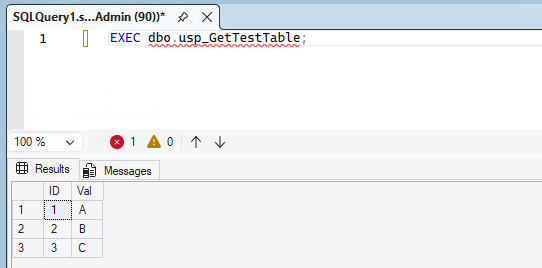
5.3 Input Parameters
Parameters allow callers to pass values into the procedure.
IF OBJECT_ID('dbo.usp_GetById', 'P') IS NOT NULL
    DROP PROCEDURE dbo.usp_GetById;
GO

CREATE PROCEDURE dbo.usp_GetById
    @Id int
AS
BEGIN
    SET NOCOUNT ON;

    SELECT ID, Val
    FROM dbo.TestTable
    WHERE ID = @Id;
END
GO

-- Call with an input parameter
EXEC dbo.usp_GetById @Id = 2;
5.4 Output Parameters & Return Codes
An output parameter returns a value back to the caller. This is useful for counts, status values, IDs, etc.
IF OBJECT_ID('dbo.usp_UpdateVal', 'P') IS NOT NULL
    DROP PROCEDURE dbo.usp_UpdateVal;
GO

CREATE PROCEDURE dbo.usp_UpdateVal
    @Id int,
    @NewVal varchar(50),
    @RowsAffected int OUTPUT
AS
BEGIN
    SET NOCOUNT ON;

    UPDATE dbo.TestTable
    SET Val = @NewVal
    WHERE ID = @Id;

    SET @RowsAffected = @@ROWCOUNT;

    -- Return code: 0 = success, 1 = not found
    IF @RowsAffected = 0
        RETURN 1;

    RETURN 0;
END
GO

DECLARE @Rows int;
DECLARE @ReturnCode int;

EXEC @ReturnCode = dbo.usp_UpdateVal
    @Id = 1,
    @NewVal = 'Updated',
    @RowsAffected = @Rows OUTPUT;

SELECT @ReturnCode AS ReturnCode, @Rows AS RowsAffected;- Output parameter: Use when you want to return additional values.
- Return code: Often used as a simple status code (0 = success).
5.5 Using TRY…CATCH in Stored Procedures
Stored procedures are a great place to standardize error handling and transactions.
IF OBJECT_ID('dbo.usp_SafeUpdate', 'P') IS NOT NULL
    DROP PROCEDURE dbo.usp_SafeUpdate;
GO

CREATE PROCEDURE dbo.usp_SafeUpdate
    @Id int,
    @NewVal varchar(50)
AS
BEGIN
    SET NOCOUNT ON;
    SET XACT_ABORT ON;

    BEGIN TRY
        BEGIN TRAN;

        IF NOT EXISTS (SELECT 1 FROM dbo.TestTable WHERE ID = @Id)
            THROW 50002, 'Target ID does not exist.', 1;

        UPDATE dbo.TestTable
        SET Val = @NewVal
        WHERE ID = @Id;

        COMMIT TRAN;
    END TRY
    BEGIN CATCH
        IF XACT_STATE() <> 0
            ROLLBACK TRAN;

        -- Re-throw the original error
        THROW;
    END CATCH
END
GO

EXEC dbo.usp_SafeUpdate @Id = 2, @NewVal = 'SafeUpdated';
Common Pitfall in STEP 5:
- Not using
SET NOCOUNT ON, causing extra “(n rows affected)” messages that may confuse applications. - Not handling errors consistently, leading to partial updates or open transactions.
STEP 6. Dynamic SQL
In this step, you will learn:
- What dynamic SQL is and when it is useful.
- The difference between
EXECandsp_executesql. - How to use parameters to build safer dynamic SQL.
- How to protect object names using
QUOTENAME. - Common pitfalls: SQL injection, quoting issues, and debugging tips.
6.1 What is Dynamic SQL?
Dynamic SQL means you build a SQL command as a string and execute it at runtime. It is useful when:
- You need to change the target table/column dynamically.
- You are building an admin script (for example, across many databases).
- You want optional filters without writing many separate queries.
Basic example
DECLARE @sql nvarchar(max);

SET @sql = N'SELECT ID, Val FROM dbo.TestTable WHERE ID >= 2;';
EXEC (@sql);
6.2 EXEC vs sp_executesql
You can execute dynamic SQL using EXEC, but sp_executesql is usually better because it supports parameters.
- EXEC: Simple, but parameters are usually embedded as text.
- sp_executesql: Supports parameters and can reuse execution plans.
DECLARE @sql nvarchar(max);
SET @sql = N'SELECT ID, Val FROM dbo.TestTable WHERE ID = 2;';
EXEC (@sql);
6.3 Parameters (Safe Dynamic SQL)
When you insert user input directly into SQL text, you risk SQL injection. A safer approach is to use parameters with sp_executesql.
DECLARE @sql nvarchar(max);
DECLARE @id int = 2;

SET @sql = N'
SELECT ID, Val
FROM dbo.TestTable
WHERE ID = @IdParam;
';

EXEC sp_executesql
    @sql,
    N'@IdParam int',
    @IdParam = @id;
Key rule:
- Use
sp_executesql+ parameters for values (numbers, strings, dates). - Do NOT concatenate user input directly into SQL text.
6.4 QUOTENAME (Protecting Object Names)
Parameters cannot replace object names (table names, column names). In that case, you must use QUOTENAME to safely wrap identifiers.
DECLARE @TableName sysname = N'TestTable';
DECLARE @sql nvarchar(max);

SET @sql = N'SELECT ID, Val FROM dbo.' + QUOTENAME(@TableName) + N';';

EXEC sp_executesql @sql;QUOTENAMEwraps names with brackets like[TestTable].- It also prevents invalid characters from breaking your SQL.
6.5 Common Pitfalls (SQL Injection & Debugging)
1) SQL injection risk
- If input comes from a user or application, never build SQL by concatenation.
- Use parameters for values, and
QUOTENAMEfor object names.
2) Quoting issues (single quotes)
- Inside a string literal, you must escape single quotes by doubling them (
'').
DECLARE @sql nvarchar(max);

SET @sql = N'SELECT ''Hello'' AS Msg;'; -- '' becomes a single quote in the executed SQL
EXEC (@sql);
3) Debugging tip: always PRINT the SQL
DECLARE @sql nvarchar(max);

SET @sql = N'SELECT ID, Val FROM dbo.TestTable WHERE ID >= 2;';
PRINT @sql;  -- Check the final SQL text
EXEC (@sql);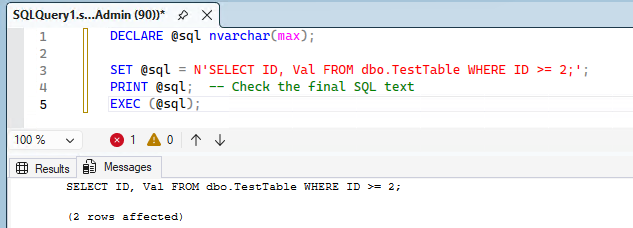
Common Pitfall in STEP 6:
- Building SQL by string concatenation and allowing SQL injection.
- Forgetting to escape quotes, causing syntax errors.
- Assuming object names can be passed as parameters (they cannot).
STEP 7. Collation (Sorting Rules)
In this step, you will learn:
- What collation is and why it matters for string comparison.
- The difference between case-insensitive and case-sensitive collations.
- How to override collation in a specific query.
7.1 What is Collation?
Collation defines the rules for sorting and comparing strings. It determines:
- Case Sensitivity (CI/CS): Is ‘A’ equal to ‘a’?
- Accent / Kana Sensitivity (AI/AS): Is ‘a’ equal to ‘á’? Are Hiragana and Katakana treated as the same or different?
- Width Sensitivity (WS): Is ‘A’ (half-width) equal to ‘A’ (full-width)?
7.2 CI_AS vs CS_AS
The default collation for many environments is typically SQL_Latin1_General_CP1_CI_AS.
- CI (Case Insensitive): ‘Apple’ = ‘apple’
- CS (Case Sensitive): ‘Apple’ ≠ ‘apple’
- AS (Accent Sensitive): Distinguishes accented characters or specific Kana differences.
7.3 Setting Collation per Query
You can override the database collation for a specific comparison using the COLLATE clause.
-- CI (Case Insensitive) Comparison
IF 'Apple' = 'apple' COLLATE SQL_Latin1_General_CP1_CI_AS
    PRINT 'Match (CI)';

-- CS (Case Sensitive) Comparison
IF 'Apple' = 'apple' COLLATE SQL_Latin1_General_CP1_CS_AS
    PRINT 'Match (CS)';
ELSE
    PRINT 'No Match (CS)';
Common Pitfall in STEP 7:
- Joining or comparing columns with different collations without explicitly using
COLLATE, which can cause errors or unexpected results.
STEP 8. Data Types
In this step, you will learn:
- The difference between fixed-length and variable-length string types.
- Why Unicode types are important for multilingual data.
- How to choose integer and decimal types correctly.
- Which date/time types are recommended in modern SQL Server.
8.1 String Types (char vs varchar)
| Type | Description | Storage |
|---|---|---|
char(n) |
Fixed length. Pads with spaces if data is shorter than n. |
Always n bytes |
varchar(n) |
Variable length. Only stores the actual data length. | Data length + 2 bytes |
varchar(max) |
Large text (modern replacement for the old TEXT type). |
Variable (up to 2GB) |
Guideline: Use char for fixed-length codes (e.g., 2-letter country codes) and varchar for general text.
8.2 Unicode (nchar, nvarchar)
Prefixing with N stores data in Unicode (UTF-16). This is essential for multilingual support. String literals must strictly use the N'' prefix.
DECLARE @good nvarchar(20) = N'고마워'; -- Correct (Unicode)
DECLARE @bad varchar(20)  = '고마워';  -- May turn into '???' or garbled text

SELECT @good, @bad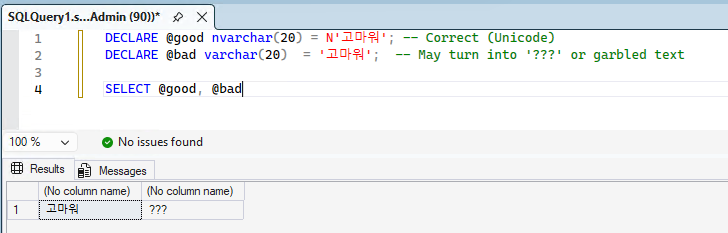
8.3 Integers & Decimals
- Integers:
tinyint(0–255),smallint,int(standard),bigint(very large values). - Exact Decimals:
decimal(p, s)ornumeric.p(precision): Total number of digits.s(scale): Digits to the right of the decimal point.
- Approximate:
float,real. (Use for scientific or statistical calculations, avoid for financial data.)
-- Recommended for money-like values
DECLARE @Price decimal(10, 2) = 12345.67;
8.4 Date & Time
Modern SQL Server (2008+) recommends newer types over the legacy datetime.
| Type | Format | Accuracy |
|---|---|---|
date |
YYYY-MM-DD | 1 day |
time |
hh:mm:ss.nnnnnnn | 100 ns |
datetime2 |
Combined date & time | 100 ns (Recommended) |
datetime |
Legacy format | 3.33 ms (Avoid for new designs) |
Common Pitfalls in STEP 8:
- Storing multilingual text in non-Unicode types (
varchar) and losing characters. - Using
floatfor money and getting rounding issues. - Choosing
datetimeinstead ofdatetime2in new tables.
STEP 9. Functions
In this step, you will learn:
- How to work with date/time using built-in functions.
- How to convert data types using
CASTandCONVERT. - Useful string and math functions for everyday T-SQL.
- How to handle
NULLvalues safely usingISNULLandCOALESCE. - How to create and use user-defined functions (UDF) for reusable logic.
9.1 Date Functions
-- Current Date & Time (local server time)
SELECT GETDATE()       AS LocalNow;

-- Current Date & Time (UTC)
SELECT SYSUTCDATETIME() AS UtcNow;

-- Add 1 month to current date
SELECT DATEADD(month, 1, GETDATE()) AS NextMonth;

-- Difference in days
SELECT DATEDIFF(day, '2025-01-01', '2025-12-31') AS DaysInYear;

-- Get part of date (Year)
SELECT DATEPART(year, GETDATE()) AS CurrentYear;
9.2 Conversion (CAST / CONVERT)
-- CAST (ANSI Standard)
SELECT CAST(123 AS varchar(10)) AS NumberAsText;

-- CONVERT (T-SQL specific, allows formatting styles)
-- Style 111 = YYYY/MM/DD
SELECT CONVERT(varchar(10), GETDATE(), 111) AS DateAsString;
9.3 String & Math Functions
-- String functions
SELECT LEFT('Hello', 2)            AS Left2;       -- 'He'
SELECT LEN('Hello')                AS Length;      -- 5
SELECT REPLACE('Hello', 'l', 'x')  AS Replaced;    -- 'Hexxo'
SELECT LOWER('Hello')              AS LowerCase;   -- 'hello'
SELECT UPPER('Hello')              AS UpperCase;   -- 'HELLO'

-- Math functions
SELECT ABS(-10)                    AS AbsoluteValue;      -- 10
SELECT ROUND(123.456, 1)           AS Rounded1Digit;      -- 123.5
SELECT POWER(2, 3)                 AS TwoToTheThird;      -- 8
9.4 Handling NULL (ISNULL, COALESCE)
-- ISNULL (T-SQL): If first value is NULL, return second
SELECT ISNULL(NULL, 'Default') AS Result1;  -- 'Default'

-- COALESCE (ANSI): Returns first non-NULL value from the list
SELECT COALESCE(NULL, NULL, 'Third', 'Fourth') AS Result2; -- 'Third'

-- Typical pattern when displaying nullable columns
SELECT
    CustomerName,
    ISNULL(PhoneNumber, 'N/A') AS PhoneNumberDisplay
FROM dbo.Customers;
9.5 Creating & Using User-Defined Functions (UDF)
SQL Server allows you to create user-defined functions to reuse logic across queries and scripts.
There are two common types:
- Scalar UDF: Returns a single value (e.g., varchar/int/datetime).
- Inline Table-Valued Function (Inline TVF): Returns a table result set (often performs well because it can be optimized like a view).
Example 1: Scalar UDF (returns one value)
USE sampleDB;
GO

IF OBJECT_ID('dbo.ufn_ValToPhonetic', 'FN') IS NOT NULL
    DROP FUNCTION dbo.ufn_ValToPhonetic;
GO

CREATE FUNCTION dbo.ufn_ValToPhonetic
(
    @Val varchar(50)
)
RETURNS varchar(20)
AS
BEGIN
    RETURN
    (
        CASE @Val
            WHEN 'A' THEN 'Alpha'
            WHEN 'B' THEN 'Bravo'
            WHEN 'C' THEN 'Charlie'
            ELSE 'Other'
        END
    );
END
GO

-- Use the scalar UDF in a SELECT
SELECT
    ID,
    Val,
    dbo.ufn_ValToPhonetic(Val) AS Phonetic
FROM dbo.TestTable
ORDER BY ID;
GO
Note: Scalar UDFs can be convenient, but in some cases they may hurt performance on large result sets. Prefer inline TVFs for “query-style” reusable logic when possible.
Example 2: Inline Table-Valued Function (returns a table)
USE sampleDB;
GO

IF OBJECT_ID('dbo.ufn_GetTestTable', 'IF') IS NOT NULL
    DROP FUNCTION dbo.ufn_GetTestTable;
GO

CREATE FUNCTION dbo.ufn_GetTestTable
(
    @MinId int
)
RETURNS TABLE
AS
RETURN
(
    SELECT ID, Val
    FROM dbo.TestTable
    WHERE ID >= @MinId
);
GO

-- Use the inline TVF like a table
SELECT *
FROM dbo.ufn_GetTestTable(2)
ORDER BY ID;
GO
Common Pitfall in STEP 9:
- Forgetting that
NULLpropagates in expressions (e.g.,Price + NULLbecomesNULL). - Relying only on
ISNULLwhen multiple expressions may beNULL;COALESCEcan be more flexible. - Overusing scalar UDFs for large queries. If performance matters, test an inline TVF alternative.
STEP 10. Temporary Objects & Advanced Queries
In this step, you will learn:
- How to use temporary tables (
#temp) for intermediate results. - How to use table variables (
@table) and understand their scope. - How to write CTEs (Common Table Expressions).
- How to write recursive queries using a recursive CTE.
10.1 Temporary Tables (#temp)
A temporary table is created in tempdb and is useful when you want to store intermediate results for multiple steps.
Create and use a temp table
-- Local temporary table (session scoped)
IF OBJECT_ID('tempdb..#TempData') IS NOT NULL DROP TABLE #TempData;

CREATE TABLE #TempData (
    ID int,
    Val varchar(50)
);

INSERT INTO #TempData (ID, Val)
SELECT ID, Val
FROM dbo.TestTable
WHERE ID >= 2;

SELECT *
FROM #TempData;

DROP TABLE #TempData;
Notes
#temptables can be indexed and can have statistics, which can help performance for larger data sets.- They can be referenced across batches (
GO) within the same session (unlike variables).
10.2 Table Variables (@table)
A table variable is like a variable that holds a table. It is often used for small intermediate results.
DECLARE @T TABLE (
    ID int,
    Val varchar(50)
);

INSERT INTO @T (ID, Val)
SELECT ID, Val
FROM dbo.TestTable
WHERE ID <= 2;

SELECT *
FROM @T;
Notes
- Table variables are scoped to the batch (and the current execution context).
- They are simple to use, but for large row counts, a temp table may perform better.
Common Pitfall in STEP 10:
- Using a table variable for large data and getting slow plans. If the data might be large, try a temp table first.
10.3 CTE (Common Table Expression)
A CTE provides a readable way to define a “temporary result set” inside a single statement.
Basic CTE example
;WITH CTE_Test AS
(
    SELECT ID, Val
    FROM dbo.TestTable
    WHERE ID >= 2
)
SELECT *
FROM CTE_Test
ORDER BY ID;- The semicolon before
WITHis important if the previous statement did not end with a semicolon. - A CTE exists only for the statement that immediately follows it.
10.4 Recursive Queries (Recursive CTE)
A recursive CTE is commonly used for hierarchical data, such as an employee/manager structure.
Setup a simple hierarchy table
IF OBJECT_ID('dbo.Employee', 'U') IS NOT NULL DROP TABLE dbo.Employee;

CREATE TABLE dbo.Employee (
    EmpID     int         NOT NULL PRIMARY KEY,
    EmpName   varchar(50) NOT NULL,
    ManagerID int         NULL
);

INSERT INTO dbo.Employee (EmpID, EmpName, ManagerID)
VALUES
(1, 'CEO', NULL),
(2, 'Manager A', 1),
(3, 'Manager B', 1),
(4, 'Staff A1', 2),
(5, 'Staff A2', 2),
(6, 'Staff B1', 3);
Recursive CTE to return the hierarchy (with level)
;WITH Org AS
(
    -- Anchor: start from the top (CEO)
    SELECT
        EmpID,
        EmpName,
        ManagerID,
        0 AS Level
    FROM dbo.Employee
    WHERE ManagerID IS NULL

    UNION ALL

    -- Recursive: join employees to their manager
    SELECT
        e.EmpID,
        e.EmpName,
        e.ManagerID,
        o.Level + 1 AS Level
    FROM dbo.Employee e
    INNER JOIN Org o
        ON e.ManagerID = o.EmpID
)
SELECT EmpID, EmpName, ManagerID, Level
FROM Org
ORDER BY Level, EmpID;
Note:
Recursive CTEs are powerful, but always make sure your data does not contain cycles (e.g., someone indirectly managing themselves). Cycles can cause infinite recursion.
This concludes No.3 Advanced Transact-SQL.
Continue learning: To extend these programming examples with guided practice, browse Udemy and search for advanced T-SQL courses with exercises on stored procedures, transactions, and complex queries. For hands-on practice with SQL Server queries and database fundamentals, explore DataCamp.